When Do Networks Create Value?

Social Capital, Brokerage, and Business Performance

SMM638 Network Analytics

The Leading Question

Important

When do networks create value for individuals and organizations?

This question drives network theory’s investigation into how structural position translates into tangible outcomes.

A Theoretical Framework

Social Capital Social Homogeneity
Network Flow Capitalization (Value Creation) Contagion
Network Architecture Coordination Adaptation (Network Change)

Our focus today: How network position creates value through social capital mechanisms

Two Theories of Network Value

Bridging Social Capital

Sparse networks bring value through access to diverse information and new opportunities.

Mechanism: Network Brokerage

Key scholar: Ron Burt (U. of Chicago)

Bonding Social Capital

Dense networks create value by fostering trust and enabling cooperation.

Mechanism: Network Closure

Key scholar: James Coleman (Columbia U.)

Part One: Bonding Social Capital

How dense networks create value through closure and trust

What is Network Closure?

Definition

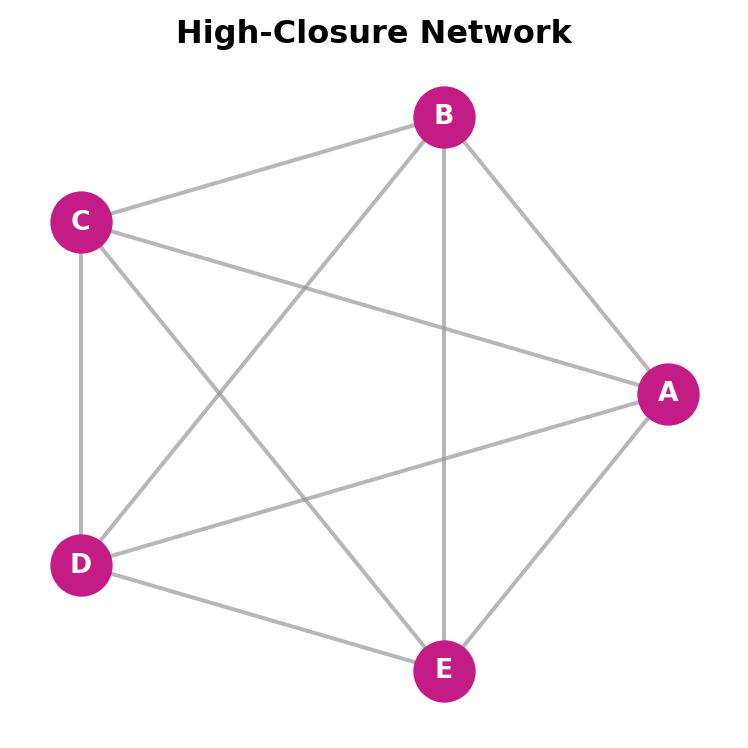
Network closure is the tendency for a network to present direct ties between pairs of nodes, creating dense, interconnected structures.

Key insight: When your friends know each other, information travels in closed loops.

This creates an environment where:

  • Reputation effects can operate
  • Social norms can be enforced
  • Trust can be established and maintained
Code
import networkx as nx
import matplotlib.pyplot as plt

# Color palette: black, magenta, gray
BLACK = '#000000'
MAGENTA = '#c41c85'
GRAY = '#999999'

# Create a fully connected network
G = nx.complete_graph(5)
labels = {i: chr(65+i) for i in range(5)}  # A, B, C, D, E

fig, ax = plt.subplots(figsize=(4, 4))
pos = nx.circular_layout(G)

nx.draw_networkx_edges(G, pos, edge_color=GRAY, width=1.5, alpha=0.7, ax=ax)
nx.draw_networkx_nodes(G, pos, node_color=MAGENTA, node_size=500, ax=ax)
nx.draw_networkx_labels(G, pos, labels, font_color='white', font_weight='bold', font_size=10, ax=ax)

ax.set_title('High-Closure Network', fontweight='bold', color=BLACK)
ax.axis('off')
plt.tight_layout()
plt.show()

How Closure Creates Value

Trust & Cooperation

Dense networks enable reciprocity. If A cheats B, mutual friend C will learn and sanction A.

Reputation Effects

Bad behavior spreads quickly. Cheating becomes “unbearable when mutual friends uncover the deceit.”

Norm Enforcement

Closed networks establish and enforce shared expectations, reducing uncertainty in transactions.

“Embedded ties protect the integrity of social and economic transactions.” — Coleman’s view of social capital

Measuring Closure: Clustering Coefficient

For a node \(i\) with degree \(k_i\), the clustering coefficient is:

\[C_i = \frac{2L_i}{k_i(k_i - 1)}\]

where \(L_i\) = number of links between the \(k_i\) neighbors of node \(i\)


Interpretation: What proportion of my friends’ possible friendships actually exist?

Code
import networkx as nx
import matplotlib.pyplot as plt
import numpy as np

# Color palette: black, magenta, gray
BLACK = '#000000'
MAGENTA = '#c41c85'
GRAY = '#999999'

# Three examples of clustering
# C = 0: star graph, no edges between neighbors
G1 = nx.Graph()
G1.add_edges_from([(0,1), (0,2), (0,3)])
colors1 = [MAGENTA, BLACK, BLACK, BLACK]

# C = 1/3: one edge between neighbors
G2 = nx.Graph()
G2.add_edges_from([(0,1), (0,2), (0,3), (1,2)])
colors2 = [MAGENTA, BLACK, BLACK, BLACK]

# C = 1: all neighbors connected
G3 = nx.Graph()
G3.add_edges_from([(0,1), (0,2), (0,3), (1,2), (2,3), (1,3)])
colors3 = [MAGENTA, BLACK, BLACK, BLACK]

fig, axes = plt.subplots(1, 3, figsize=(9, 3))

# Star layout with center at origin
def star_layout(G):
    pos = {0: (0, 0)}
    neighbors = list(G.neighbors(0))
    for i, n in enumerate(neighbors):
        angle = 2 * np.pi * i / len(neighbors) - np.pi/2
        pos[n] = (0.8 * np.cos(angle), 0.8 * np.sin(angle))
    return pos

for ax, G, colors, title in [(axes[0], G1, colors1, 'C = 0'),
                              (axes[1], G2, colors2, 'C = 1/3'),
                              (axes[2], G3, colors3, 'C = 1')]:
    pos = star_layout(G)
    nx.draw_networkx_edges(G, pos, edge_color=GRAY, width=1.5, ax=ax)
    nx.draw_networkx_nodes(G, pos, node_color=colors, node_size=400, ax=ax)
    ax.set_title(title, fontweight='bold', color=BLACK)
    ax.axis('off')

plt.tight_layout()
plt.show()
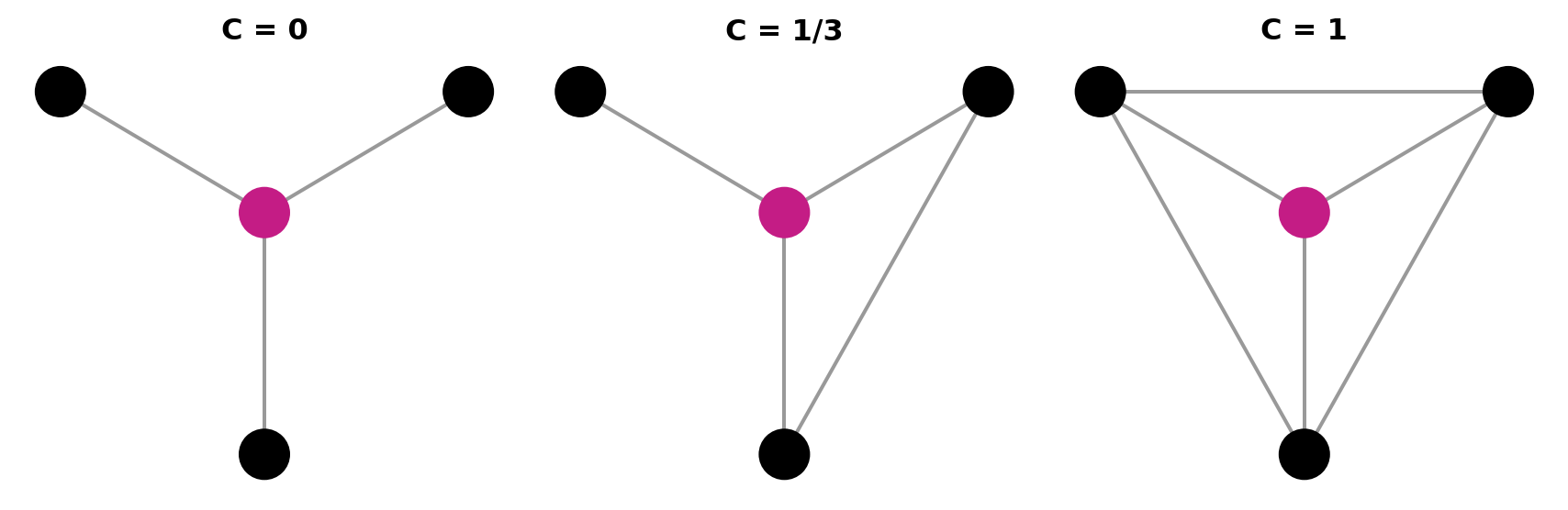
Center node (magenta) with three neighbors (black)

Part Two: Bridging Social Capital

Note

How sparse networks create value through brokerage and information access

The Strength of Weak Ties

Granovetter’s Discovery (1973)

Job seekers found new positions through acquaintances rather than close friends—people they saw “occasionally” or “rarely.”

Why? Your close friends know what you know.

  • Strong ties move in overlapping social circles
  • Information from friends is often redundant
  • Weak ties connect to different social worlds
  • Each acquaintance provides unique, non-overlapping information
Code
import networkx as nx
import matplotlib.pyplot as plt
import numpy as np

# Color palette: black, magenta, gray
BLACK = '#000000'
MAGENTA = '#c41c85'
GRAY = '#999999'

# Create a network showing weak ties bridging communities
G = nx.Graph()
edges = [
    (0,1), (0,2), (1,2),  # Left cluster (strong ties)
    (0,3),                 # Weak tie bridge
    (3,4), (3,5), (4,5),  # Right cluster (strong ties)
    (0,6),                 # Another weak tie
    (6,7), (6,8)          # Another cluster
]
G.add_edges_from(edges)

# Edge styles: weak ties are dashed
strong_edges = [(0,1), (0,2), (1,2), (3,4), (3,5), (4,5), (6,7), (6,8)]
weak_edges = [(0,3), (0,6)]

# Node colors and sizes
node_colors = [MAGENTA] + [BLACK]*8
node_sizes = [500] + [300]*8

fig, ax = plt.subplots(figsize=(5, 4))
np.random.seed(42)
pos = nx.spring_layout(G, seed=42)

# Draw strong edges (solid)
nx.draw_networkx_edges(G, pos, edgelist=strong_edges, edge_color=GRAY, width=2, alpha=0.7, ax=ax)
# Draw weak edges (dashed)
nx.draw_networkx_edges(G, pos, edgelist=weak_edges, edge_color=GRAY, width=1, style='dashed', alpha=0.7, ax=ax)
# Draw nodes
nx.draw_networkx_nodes(G, pos, node_color=node_colors, node_size=node_sizes, ax=ax)

ax.set_title('Weak Ties Bridge Communities', fontweight='bold', color=BLACK)
ax.axis('off')
plt.tight_layout()
plt.show()

Dashed lines = weak ties spanning clusters

Structural Holes: Burt’s Framework

Definition

A structural hole is the “empty space” in a network between two sets of nodes that do not otherwise interact closely.

Individuals who span structural holes gain:

Information

Early access to diverse, non-redundant knowledge

Control

Ability to broker and synthesize across groups

Code
import networkx as nx
import matplotlib.pyplot as plt

# Color palette: black, magenta, gray
BLACK = '#000000'
MAGENTA = '#c41c85'
GRAY = '#999999'
DARK_GRAY = '#555555'

# Create structural hole visualization
G = nx.Graph()
edges = [
    (0,1), (0,2), (1,2), (1,3), (2,3),  # Left cluster
    (4,5), (4,6), (5,6), (5,7), (6,7),  # Right cluster
    (3,8), (7,8)                         # Broker connections
]
G.add_edges_from(edges)

# Node colors: left cluster (black), right cluster (dark gray), broker (magenta)
node_colors = [BLACK]*4 + [DARK_GRAY]*4 + [MAGENTA]
node_sizes = [300]*8 + [600]
labels = {8: 'B'}

# Fixed positions
pos = {
    0: (-2, 1), 1: (-2, 0), 2: (-1.5, 0.5), 3: (-1, 0),
    4: (2, 1), 5: (2, 0), 6: (1.5, 0.5), 7: (1, 0),
    8: (0, 0)
}

fig, ax = plt.subplots(figsize=(5, 4))
nx.draw_networkx_edges(G, pos, edge_color=GRAY, width=1.5, ax=ax)
nx.draw_networkx_nodes(G, pos, node_color=node_colors, node_size=node_sizes, ax=ax)
nx.draw_networkx_labels(G, pos, labels, font_color='white', font_weight='bold', font_size=12, ax=ax)

ax.set_title('Broker Spanning Structural Hole', fontweight='bold', color=BLACK)
ax.axis('off')
plt.tight_layout()
plt.show()
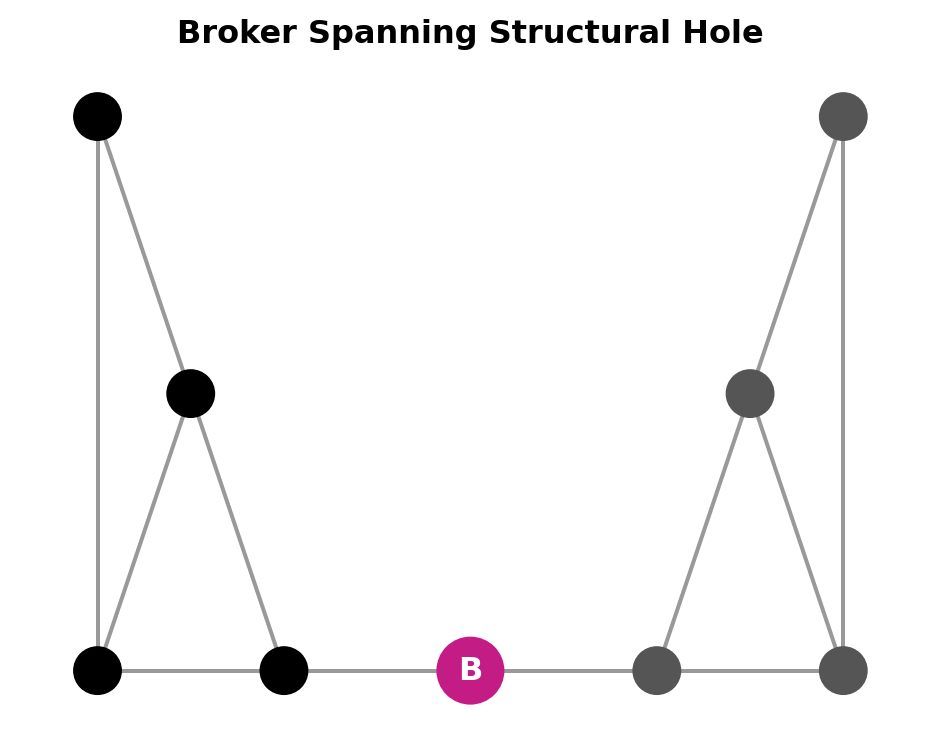
Node B spans the gap between two clusters

The Brokerage Advantage

1. Non-Redundant Information

Brokers access information from multiple, unconnected sources—each providing unique knowledge.

2. Early Access

Information reaches brokers first because they sit at the intersection of communication flows.

3. Strategic Control

Brokers can regulate information flow, synthesize ideas across groups, and create new combinations.

💡 “People with networks rich in structural holes have better ideas.” — Ron Burt, research on managers at a large electronics company

Measuring Brokerage Position

Betweenness Centrality

How often does a node lie on the shortest path between others?

\[C_B(i) = \sum_{j<k} \frac{g_{jk}(i)}{g_{jk}}\]

Identifies nodes that can interrupt flow between actors.

Burt’s Constraint Index

How much of your network is concentrated in redundant contacts?

  • Low constraint = many structural holes = brokerage advantage
  • High constraint = contacts all know each other = no brokerage
Code
import networkx as nx
import matplotlib.pyplot as plt
import numpy as np

# Color palette: black, magenta, gray
BLACK = '#000000'
MAGENTA = '#c41c85'
GRAY = '#999999'

# High constraint (closed network - complete graph)
G1 = nx.complete_graph(4)
colors1 = [MAGENTA] + [BLACK]*3

# Low constraint (star graph - structural holes)
G2 = nx.star_graph(4)  # Center node 0 connected to 1,2,3,4
colors2 = [MAGENTA] + [BLACK]*4

fig, axes = plt.subplots(1, 2, figsize=(8, 4))

# Star layout for high constraint
pos1 = {0: (0, 0)}
for i in range(1, 4):
    angle = 2 * np.pi * (i-1) / 3 - np.pi/2
    pos1[i] = (0.8 * np.cos(angle), 0.8 * np.sin(angle))

nx.draw_networkx_edges(G1, pos1, edge_color=GRAY, width=1.5, ax=axes[0])
nx.draw_networkx_nodes(G1, pos1, node_color=colors1, node_size=400, ax=axes[0])
axes[0].set_title('High Constraint', fontweight='bold', color=BLACK)
axes[0].axis('off')

# Star layout for low constraint
pos2 = {0: (0, 0)}
for i in range(1, 5):
    angle = 2 * np.pi * (i-1) / 4 - np.pi/2
    pos2[i] = (0.8 * np.cos(angle), 0.8 * np.sin(angle))

nx.draw_networkx_edges(G2, pos2, edge_color=GRAY, width=1.5, ax=axes[1])
nx.draw_networkx_nodes(G2, pos2, node_color=colors2, node_size=400, ax=axes[1])
axes[1].set_title('Low Constraint', fontweight='bold', color=BLACK)
axes[1].axis('off')

plt.tight_layout()
plt.show()
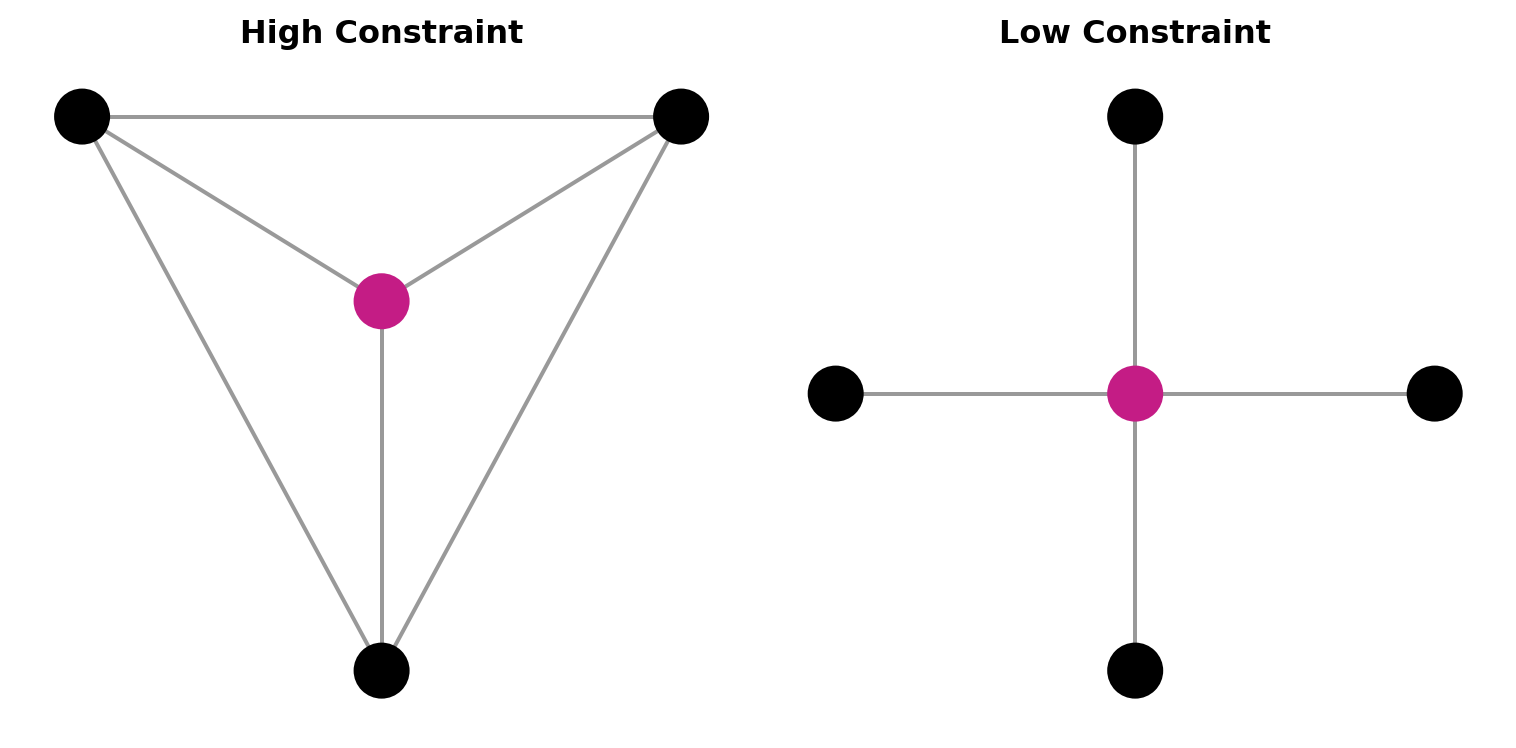
Magenta node = focal actor. Lower constraint = richer structural holes.

Part Three: Business Applications

How organizations leverage network analytics for competitive advantage

Case: RBC Fraud Detection

CASE STUDY Royal Bank of Canada — First-Party Fraud

The Challenge: Fraudsters build good credit over years, then “bust out” by withdrawing from multiple seemingly unconnected accounts.

Network Insight

Fraudsters share connections: same phone numbers, addresses, or patterns of money transfers. Their connectivity is both their strength and vulnerability.

SNA Application:

  • Map money flow networks between accounts
  • Identify dense clusters sharing data elements
  • Use homophily—fraudsters connect to fraudsters
Code
import networkx as nx
import matplotlib.pyplot as plt

# Color palette: black, magenta, gray
BLACK = '#000000'
MAGENTA = '#c41c85'
GRAY = '#999999'

# Fraud ring (connected cluster)
G = nx.Graph()
fraud_edges = [(0,1), (0,2), (1,2), (1,3), (2,3), (0,3)]
G.add_edges_from(fraud_edges)
# Add isolated legitimate accounts
G.add_nodes_from([4, 5, 6, 7])

# Node colors: fraud ring (magenta), legitimate (gray)
node_colors = [MAGENTA]*4 + [GRAY]*4

# Fixed positions
pos = {
    0: (-1.5, 0.5), 1: (-1, 1), 2: (-1, 0), 3: (-0.5, 0.5),
    4: (1, 1), 5: (1.5, 0.8), 6: (1.2, 0.3), 7: (1.6, 0.1)
}

fig, ax = plt.subplots(figsize=(5, 4))
nx.draw_networkx_edges(G, pos, edge_color=MAGENTA, width=2, ax=ax)
nx.draw_networkx_nodes(G, pos, node_color=node_colors, node_size=400, ax=ax)

ax.set_title('Fraud Ring Detection', fontweight='bold', color=BLACK)
ax.axis('off')
plt.tight_layout()
plt.show()
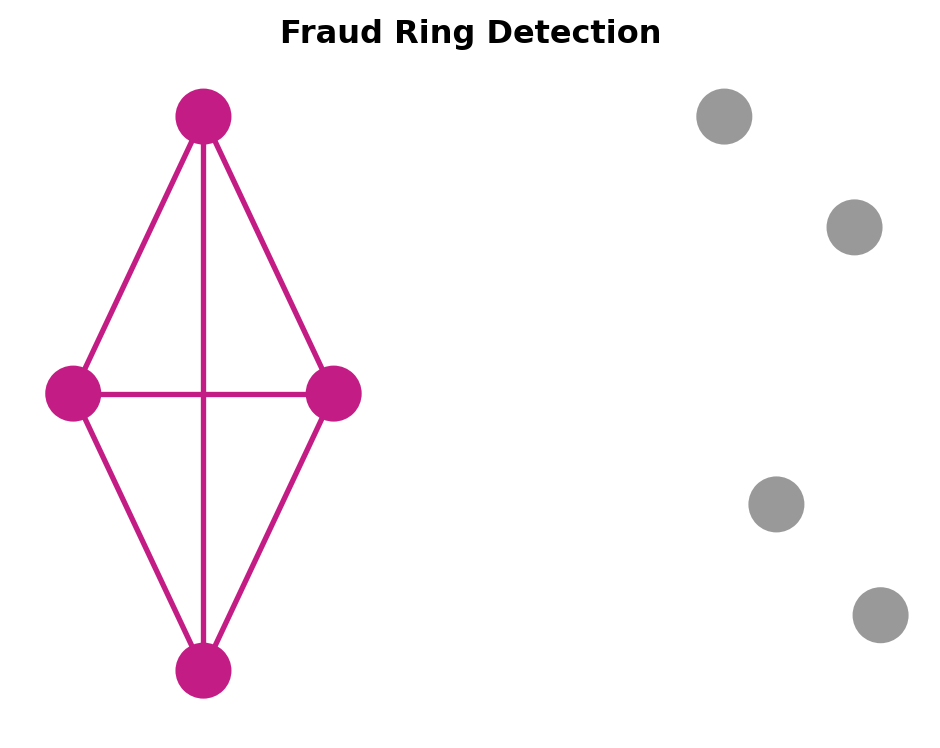
Result: Reduced false positive rate from 85:1 to target of 10:1

Networks Inside Organizations

Organizations have two structures: formal hierarchy (org charts) and informal networks (who actually works with whom).

Collaboration

Identify top value creators and connect them with emerging talent. Combat “groupthink” in isolated teams.

Change Agents

Find influential nodes who shape organizational culture. Use them to accelerate change initiatives.

Information Brokers

Locate people who bridge functions. Often invisible but crucial—losing them disrupts knowledge flow.

“Network analysis is a tool that allows leaders to optimize collaboration and information exchange, rather than maximizing structures and hoping for the best.” — Cross & Thomas

Inter-Organizational Networks

Board Interlocks When the same individual serves on multiple corporate boards, organizations become connected through a shared director network.

Strategic implications:

  • Information diffusion: Best practices spread through connected boards
  • Coordination: Linked firms may align strategies
  • Status transfer: Connections to prestigious boards signal legitimacy
  • Resource access: Networks facilitate M&A and partnerships
Code
import networkx as nx
import matplotlib.pyplot as plt
import numpy as np

# Color palette: black, magenta, gray
BLACK = '#000000'
MAGENTA = '#c41c85'
GRAY = '#999999'

# Board interlock network (bipartite: companies and directors)
G = nx.Graph()
edges = [
    ('Boeing', 'Dir1'), ('3M', 'Dir1'), ('Sara Lee', 'Dir1'),
    ('Xerox', 'Dir2'), ('Dow', 'Dir2'), ('Sara Lee', 'Dir2')
]
G.add_edges_from(edges)

# Node properties
companies = ['Boeing', '3M', 'Costco', 'Xerox', 'Dow']
directors = ['Dir1', 'Dir2']

node_colors = [BLACK if n in companies else MAGENTA for n in G.nodes()]
node_sizes = [1600 if n in companies else 500 for n in G.nodes()]
labels = {n: n if n in companies else '' for n in G.nodes()}

fig, ax = plt.subplots(figsize=(5, 4))
np.random.seed(42)
pos = nx.spring_layout(G, seed=42)

nx.draw_networkx_edges(G, pos, edge_color=GRAY, width=1.5, alpha=0.7, ax=ax)
nx.draw_networkx_nodes(G, pos, node_color=node_colors, node_size=node_sizes, ax=ax)
nx.draw_networkx_labels(G, pos, labels, font_size=8, font_color='white', font_weight='bold', ax=ax)

ax.set_title('Board Interlock Network', fontweight='bold', color=BLACK)
ax.axis('off')
plt.tight_layout()
plt.show()
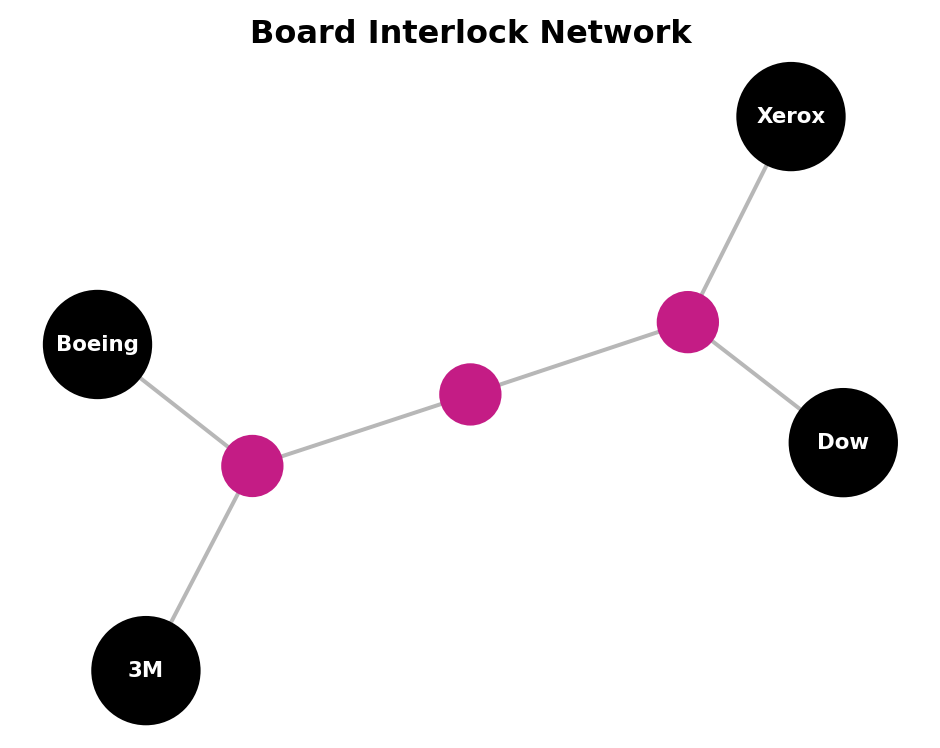
Directors (magenta) create bridges between firms (black)

The Strategic Tension

Closure: Safety

  • Trust through mutual monitoring
  • Protection from cheating
  • Stable, predictable relationships
  • Good for high-risk transactions

Tradeoff: Redundant information, limited novelty

Brokerage: Opportunity

  • Access to diverse information
  • Early awareness of opportunities
  • Control over information flows
  • Good for innovation and ideas

Tradeoff: Less protection, harder to mobilize support

Key Insight: The optimal network structure depends on what you’re trying to achieve.

Information access favors brokerage. Trust-dependent transactions favor closure.

Key Takeaways

1

Networks create value through two mechanisms

Closure enables trust; Brokerage provides information access.

2

Position matters more than connections

It’s not just how many ties you have, but where they connect you in the network.

3

Network analytics has diverse business applications

From fraud detection to organizational design to understanding competitive dynamics.

4

Context determines optimal structure

Innovation needs bridges. Trust-dependent transactions need closure.

Questions?

Discussion Prompt

Think about your own professional network. Are you more of a broker spanning different groups, or embedded in a closed cluster of close colleagues?