Code
# Load required libraries
library(tidyverse)
library(ggplot2)
library(scales)
library(knitr)

# Set theme for plots
theme_set(theme_minimal())Week 3 - Network Analytics
This exploratory data analysis examines the Twitch network dataset, focusing on node attributes of Twitch streamers. The dataset includes information about streamer activity, content type, viewership, and affiliate status.
# Load required libraries
library(tidyverse)
library(ggplot2)
library(scales)
library(knitr)
# Set theme for plots
theme_set(theme_minimal())# Read the Twitch nodes data
twitch_nodes <- read_csv("../../../data/twitch/Twitch_nodes.csv")
# Display data structure
cat("Dataset dimensions:", nrow(twitch_nodes), "rows,", ncol(twitch_nodes), "columns\n")Dataset dimensions: 7126 rows, 6 columnsThe Twitch dataset contains information about streamers including: - ID: Streamer identifier - Days_active: Number of days the streamer has been active - Mature_content: Whether the channel contains mature content (TRUE/FALSE) - Views: Total number of views - Affiliate: Whether the streamer has affiliate status (TRUE/FALSE) - Channel_ID: Unique channel identifier
# Create a summary table of data types
data_summary <- data.frame(
  Variable = names(twitch_nodes),
  Type = sapply(twitch_nodes, class),
  Missing = sapply(twitch_nodes, function(x) sum(is.na(x))),
  Unique = sapply(twitch_nodes, function(x) length(unique(x))),
  stringsAsFactors = FALSE,
  row.names = NULL
)

kable(data_summary, caption = "Data Structure Summary", row.names = FALSE)| Variable | Type | Missing | Unique |
|---|---|---|---|
| ID | numeric | 0 | 7126 |
| Days_active | numeric | 0 | 2565 |
| Mature_content | logical | 0 | 2 |
| Views | numeric | 0 | 5822 |
| Affiliate | logical | 0 | 2 |
| Channel_ID | numeric | 0 | 7126 |
# Calculate summary statistics
views_summary <- twitch_nodes %>%
  summarise(
    Min = min(Views),
    Q1 = quantile(Views, 0.25),
    Median = median(Views),
    Mean = mean(Views),
    Q3 = quantile(Views, 0.75),
    Max = max(Views)
  )

kable(views_summary, caption = "Views Summary Statistics", format.args = list(big.mark = ","))| Min | Q1 | Median | Mean | Q3 | Max |
|---|---|---|---|---|---|
| 5 | 1,743 | 4,839.5 | 193,470.2 | 15,263 | 178,500,544 |
# Create histogram with log scale
p1 <- ggplot(twitch_nodes, aes(x = Views)) +
  geom_histogram(bins = 50, fill = "#9146FF", alpha = 0.8, color = "white") +
  scale_x_log10(labels = comma) +
  geom_vline(aes(xintercept = median(Views)),
             color = "red", linetype = "dashed", size = 1) +
  labs(title = "Distribution of Channel Views (Log Scale)",
       subtitle = paste("Median:", format(median(twitch_nodes$Views), big.mark = ",")),
       x = "Views (log scale)",
       y = "Number of Streamers") +
  theme(plot.title = element_text(hjust = 0.5, face = "bold"),
        plot.subtitle = element_text(hjust = 0.5))

p1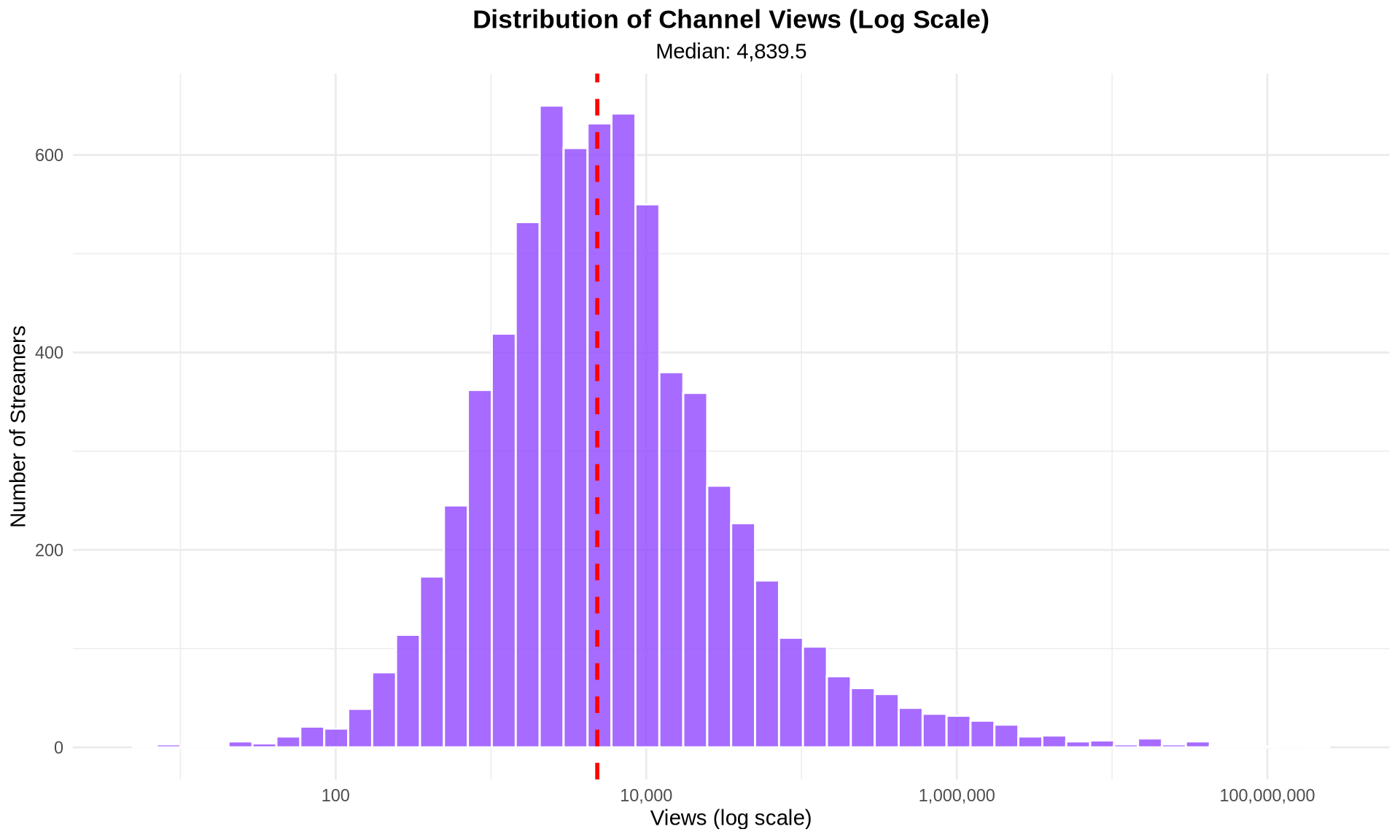
# Create summary tables
categorical_summary <- bind_rows(
  twitch_nodes %>%
    count(Mature_content) %>%
    mutate(Variable = "Mature Content",
           Category = as.character(Mature_content),
           Percentage = round(n / sum(n) * 100, 1)),

  twitch_nodes %>%
    count(Affiliate) %>%
    mutate(Variable = "Affiliate Status",
           Category = as.character(Affiliate),
           Percentage = round(n / sum(n) * 100, 1))
) %>%
  select(Variable, Category, n, Percentage)

kable(categorical_summary, caption = "Categorical Variables Distribution")| Variable | Category | n | Percentage |
|---|---|---|---|
| Mature Content | FALSE | 3238 | 45.4 |
| Mature Content | TRUE | 3888 | 54.6 |
| Affiliate Status | FALSE | 6742 | 94.6 |
| Affiliate Status | TRUE | 384 | 5.4 |
p2 <- twitch_nodes %>%
  mutate(Affiliate = factor(Affiliate,
                           levels = c(FALSE, TRUE),
                           labels = c("Non-Affiliate", "Affiliate"))) %>%
  ggplot(aes(x = Affiliate, y = Views, fill = Affiliate)) +
  geom_violin(alpha = 0.6) +
  geom_boxplot(width = 0.2, alpha = 0.8) +
  scale_y_log10(labels = comma) +
  scale_fill_manual(values = c("#9146FF", "#1DB954")) +
  labs(title = "Views Distribution by Affiliate Status",
       x = "Affiliate Status",
       y = "Views (log scale)") +
  theme(legend.position = "none",
        plot.title = element_text(hjust = 0.5, face = "bold"))

p2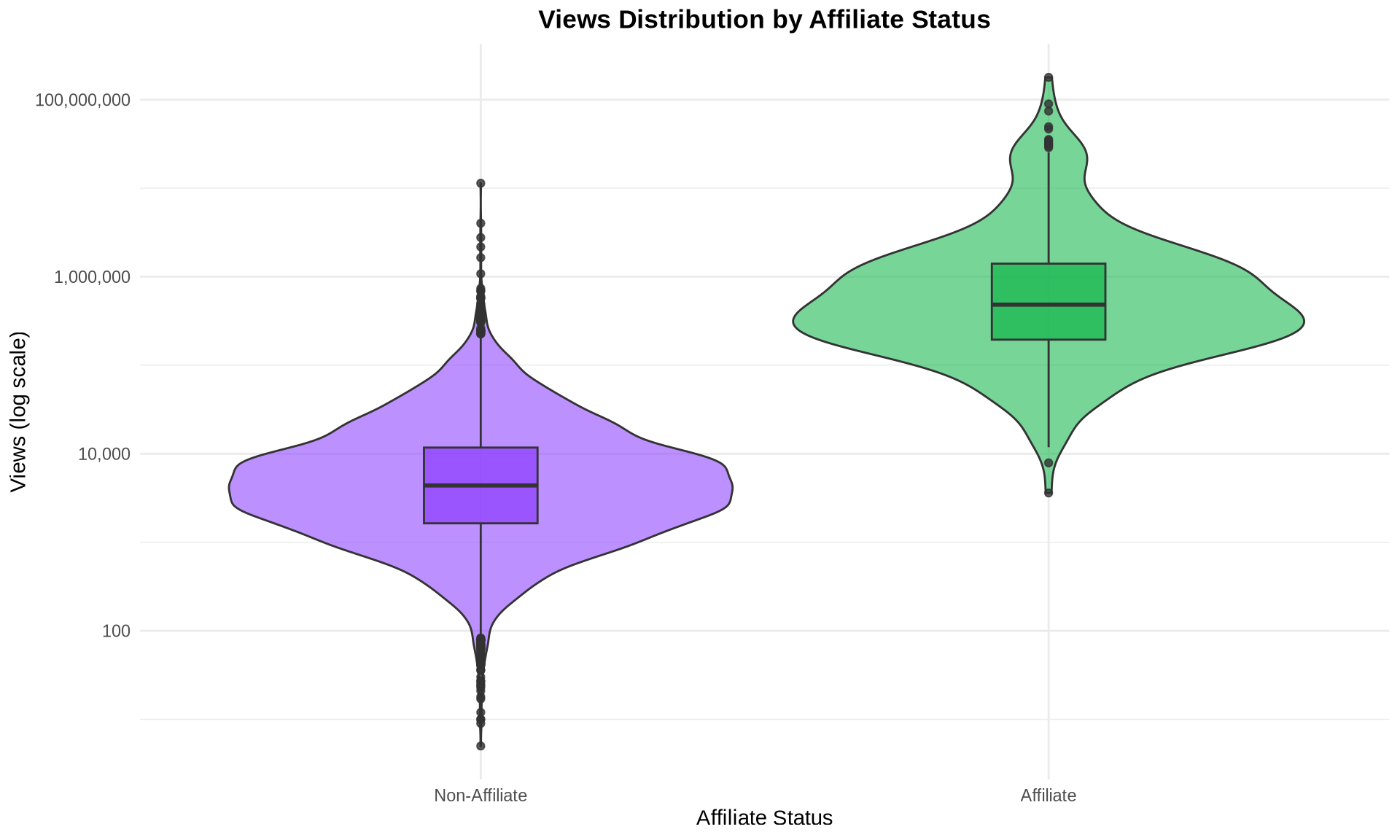
p3 <- ggplot(twitch_nodes, aes(x = Days_active, y = Views)) +
  geom_point(aes(color = Affiliate, shape = Mature_content),
             alpha = 0.6, size = 2) +
  scale_y_log10(labels = comma) +
  scale_color_manual(values = c("#9146FF", "#1DB954"),
                     labels = c("Non-Affiliate", "Affiliate")) +
  scale_shape_manual(values = c(16, 17),
                     labels = c("Non-Mature", "Mature")) +
  geom_smooth(method = "lm", se = TRUE, alpha = 0.2) +
  labs(title = "Relationship between Days Active and Views",
       x = "Days Active",
       y = "Views (log scale)",
       color = "Affiliate Status",
       shape = "Content Type") +
  theme(plot.title = element_text(hjust = 0.5, face = "bold"))

p3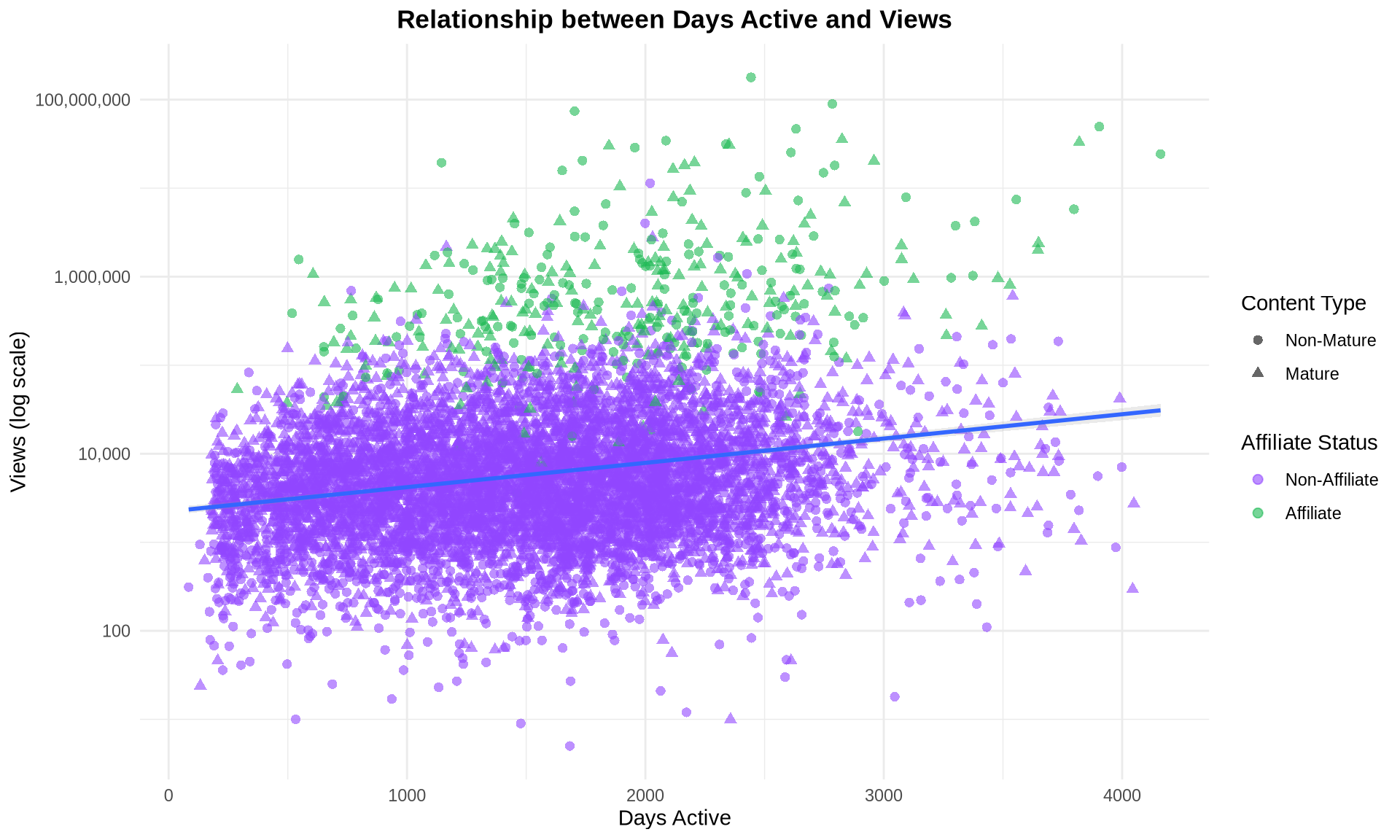
# Create detailed cross-tabulation
cross_analysis <- twitch_nodes %>%
  group_by(Mature_content, Affiliate) %>%
  summarise(
    Count = n(),
    Avg_Views = mean(Views),
    Median_Views = median(Views),
    Avg_Days_Active = mean(Days_active),
    .groups = "drop"
  ) %>%
  mutate(
    Avg_Views = round(Avg_Views),
    Avg_Days_Active = round(Avg_Days_Active),
    Mature_content = ifelse(Mature_content, "Mature", "Non-Mature"),
    Affiliate = ifelse(Affiliate, "Affiliate", "Non-Affiliate")
  )

kable(cross_analysis,
      caption = "Average Metrics by Content Type and Affiliate Status",
format.args = list(big.mark = ","))| Mature_content | Affiliate | Count | Avg_Views | Median_Views | Avg_Days_Active |
|---|---|---|---|---|---|
| Non-Mature | Non-Affiliate | 3,041 | 18,934 | 3,261 | 1,487 |
| Non-Mature | Affiliate | 197 | 4,393,289 | 478,931 | 1,966 |
| Mature | Non-Affiliate | 3,701 | 17,297 | 5,584 | 1,514 |
| Mature | Affiliate | 187 | 2,094,097 | 488,224 | 1,913 |
# Affiliate status comparison
affiliate_test <- t.test(log10(Views + 1) ~ Affiliate, data = twitch_nodes)
cat("T-test: Affiliate vs Non-Affiliate (log-transformed views)\n")
T-test: Affiliate vs Non-Affiliate (log-transformed views)cat("t =", round(affiliate_test$statistic, 4), "\n")t = -54.6025 cat("p-value =", format.pval(affiliate_test$p.value), "\n")p-value = < 2.22e-16 cat("Mean difference =", round(diff(affiliate_test$estimate), 4), "log units\n")Mean difference = 2.095 log units# Identify top 10 channels by views
top_channels <- twitch_nodes %>%
arrange(desc(Views)) %>%
slice_head(n = 10) %>%
mutate(
Rank = row_number(),
Views = format(Views, big.mark = ","),
Content_Type = ifelse(Mature_content, "Mature", "Non-Mature"),
Status = ifelse(Affiliate, "Affiliate", "Non-Affiliate")
) %>%
select(Rank, Channel_ID, Views, Days_active, Content_Type, Status)
kable(top_channels, caption = "Top 10 Twitch Channels by Views")| Rank | Channel_ID | Views | Days_active | Content_Type | Status |
|---|---|---|---|---|---|
| 1 | 27942990 | 178,500,544 | 2443 | Non-Mature | Affiliate |
| 2 | 20786541 | 89,506,813 | 2784 | Non-Mature | Affiliate |
| 3 | 56648155 | 74,201,622 | 1703 | Non-Mature | Affiliate |
| 4 | 261715 | 49,482,563 | 3904 | Non-Mature | Affiliate |
| 5 | 23735582 | 46,682,923 | 2632 | Non-Mature | Affiliate |
| 6 | 19623411 | 35,482,126 | 2825 | Mature | Affiliate |
| 7 | 39677337 | 34,356,681 | 2086 | Non-Mature | Affiliate |
| 8 | 497952 | 32,861,608 | 3820 | Mature | Affiliate |
| 9 | 30623831 | 31,417,100 | 2338 | Non-Mature | Affiliate |
| 10 | 30281925 | 30,977,250 | 2351 | Mature | Affiliate |
# Calculate key metrics
insights <- list(
  total_streamers = nrow(twitch_nodes),
  avg_views = mean(twitch_nodes$Views),
  median_views = median(twitch_nodes$Views),
  affiliate_rate = mean(twitch_nodes$Affiliate) * 100,
  mature_content_rate = mean(twitch_nodes$Mature_content) * 100,
  views_ratio = mean(twitch_nodes$Views) / median(twitch_nodes$Views)
)
Summary of Key Findings:
This analysis provides context for understanding how node attributes might relate to network centrality measures in the Twitch streamer ecosystem.