Role and Position Analysis in R

Blockmodeling and Structural Equivalence

1 Introduction

This tutorial demonstrates how to analyze roles and positions in networks using R. Unlike community detection, which looks for cohesive subgroups (cliques, clusters), role analysis seeks to identify actors who behave similarly, even if they are not connected to each other. For example, two teachers in different schools may never interact, but they occupy the same ‘role’ because they have similar relationships with students, principals, and parents.

We will explore structural equivalence, implement the classic CONCOR algorithm, perform blockmodeling, and create image matrices to uncover the underlying role structure of networks.

1.1 Learning Objectives

By the end of this tutorial, you will be able to:

  • Understand different concepts of structural equivalence
  • Compute similarity measures between actors based on tie patterns
  • Implement the CONCOR algorithm for blockmodeling
  • Perform hierarchical clustering of tie profiles
  • Create and interpret blockmodels and image matrices
  • Visualize role structures in networks
  • Assess the quality of blockmodel fits

1.2 Required Packages

# Load required packages
library(igraph)
library(ggplot2)

# Optional packages (install if needed)
if (!require("pheatmap", quietly = TRUE)) {
  cat("Note: pheatmap not installed. Using base heatmap instead.\n")
  use_pheatmap <- FALSE
} else {
  use_pheatmap <- TRUE
}
Note: pheatmap not installed. Using base heatmap instead.
# Set seed for reproducibility
set.seed(42)

2 Understanding Structural Equivalence

2.1 Concepts

Structural Equivalence is the most stringent definition of position. Two actors are structurally equivalent if they have identical ties to and from the exact same other actors. They are perfectly substitutable in the network structure.

In practice, perfect equivalence is rare. We look for approximate equivalence—actors who have similar patterns of ties.

There are other forms of equivalence, such as:

  1. Structural equivalence: Actors have identical ties to the same others.
  2. Regular equivalence: Actors have ties to others who are themselves equivalent (e.g., two doctors are equivalent because they both treat patients, even if they treat different patients).

This tutorial focuses on structural equivalence, which is the foundation of classical blockmodeling.

2.2 Example Network: Corporate Advice Network

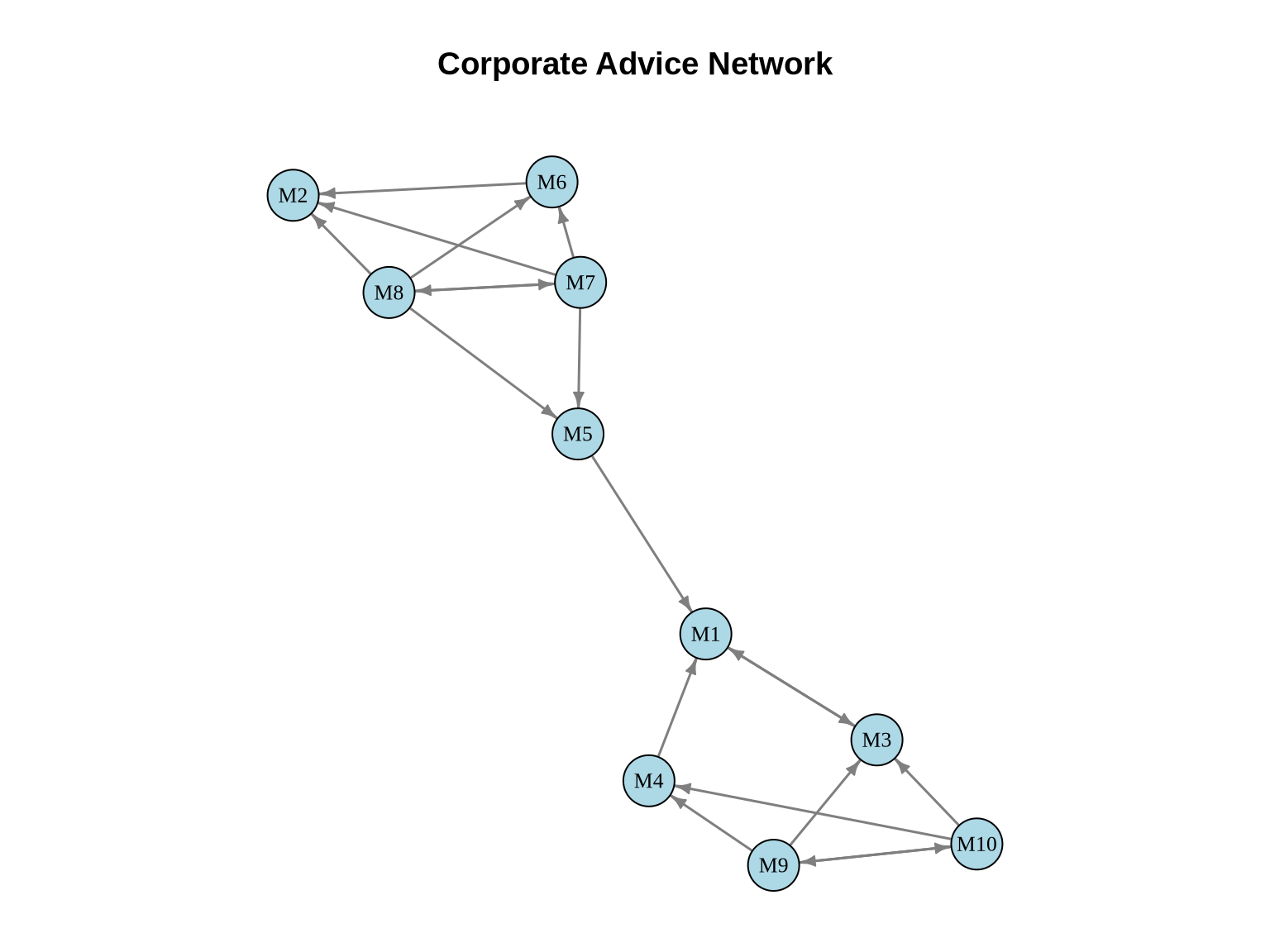
Let’s create a small directed network representing advice-seeking among managers:

# Create advice network adjacency matrix
advice_mat <- matrix(0, nrow = 10, ncol = 10)
rownames(advice_mat) <- colnames(advice_mat) <- paste0("M", 1:10)

# Senior managers (M1, M2) - give advice, rarely seek it
advice_mat["M3", "M1"] <- 1
advice_mat["M4", "M1"] <- 1
advice_mat["M5", "M1"] <- 1
advice_mat["M6", "M2"] <- 1
advice_mat["M7", "M2"] <- 1
advice_mat["M8", "M2"] <- 1

# Middle managers (M3, M4) - seek from seniors, advise juniors
advice_mat["M1", "M3"] <- 1  # Senior asks middle (rare)
advice_mat["M9", "M3"] <- 1
advice_mat["M10", "M3"] <- 1
advice_mat["M9", "M4"] <- 1
advice_mat["M10", "M4"] <- 1

# Middle managers (M5, M6) - similar pattern
advice_mat["M7", "M5"] <- 1
advice_mat["M8", "M5"] <- 1
advice_mat["M7", "M6"] <- 1
advice_mat["M8", "M6"] <- 1

# Junior managers (M7, M8, M9, M10) - mainly seek advice
advice_mat["M7", "M8"] <- 1  # Some peer connections
advice_mat["M8", "M7"] <- 1
advice_mat["M9", "M10"] <- 1
advice_mat["M10", "M9"] <- 1

# Create network object  
advice_net <- graph_from_adjacency_matrix(advice_mat, mode = "directed")

cat("Network size:", vcount(advice_net), "nodes\n")
Network size: 10 nodes
cat("Number of ties:", ecount(advice_net), "edges\n")
Number of ties: 19 edges
cat("Density:", round(edge_density(advice_net), 3), "\n")
Density: 0.211 

2.3 Visualize the Advice Network

# Plot the network
set.seed(42)
layout_advice <- layout_with_fr(advice_net)

# Set margins to ensure title is within bounding box
par(mar = c(1, 1, 4, 1))
plot(advice_net,
     layout = layout_advice,
     vertex.color = "lightblue",
     vertex.size = 15,
     vertex.label = V(advice_net)$name,
     vertex.label.cex = 0.8,
     vertex.label.color = "black",
     edge.color = "gray50",
     edge.width = 1.5,
     edge.arrow.size = 0.5,
     main = "Corporate Advice Network")

3 Measuring Structural Equivalence

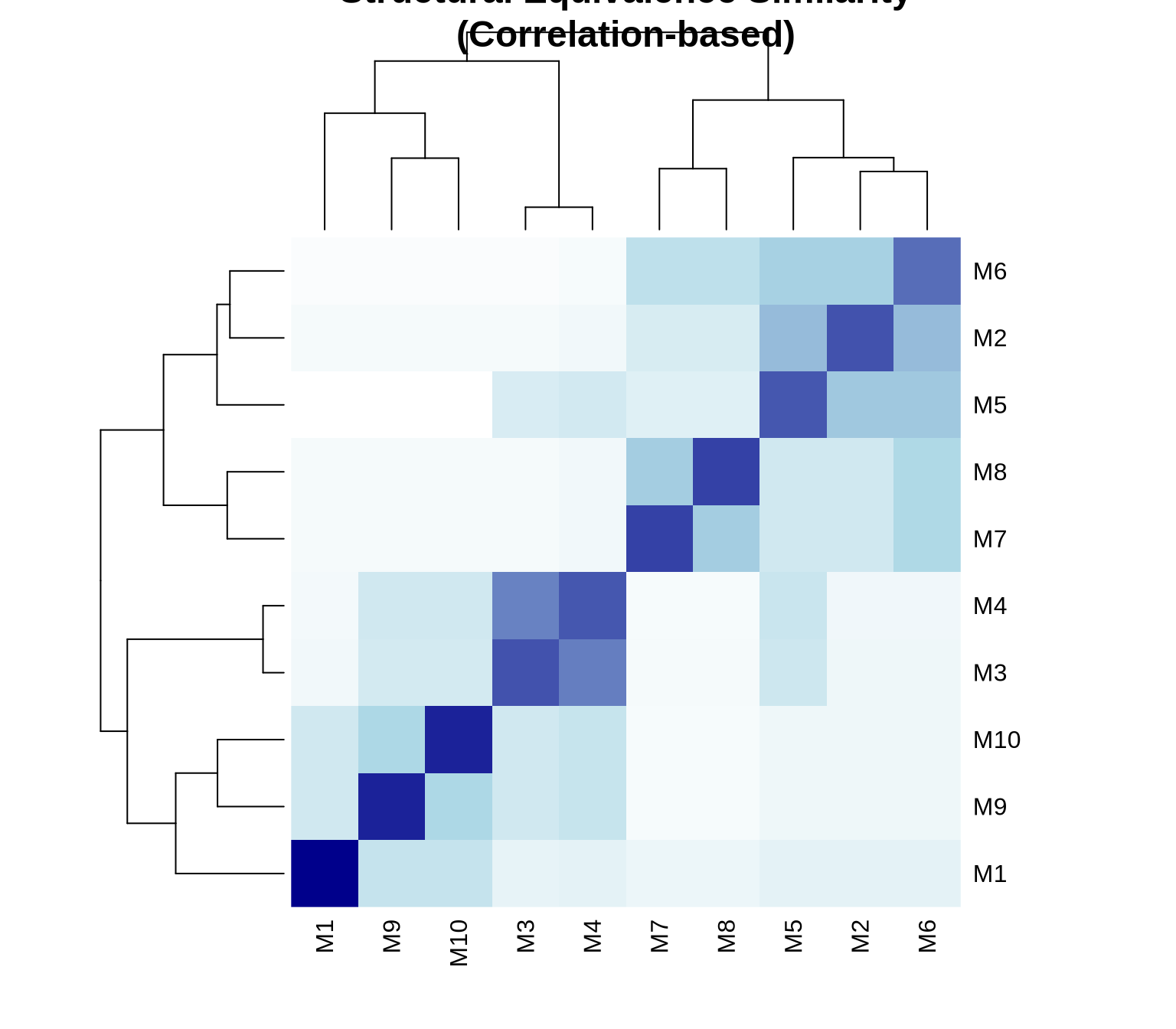
3.1 Correlation-Based Similarity

One common approach is to calculate the Pearson correlation between the tie profiles (rows/columns of the adjacency matrix) of pairs of actors.

  • High positive correlation (+1): Actors have very similar tie patterns.
  • High negative correlation (-1): Actors have opposite tie patterns.
  • Correlation focuses on the pattern or shape of ties, normalizing for the total number of ties.
# Calculate structural equivalence using correlation
# For directed networks, we consider both in-ties and out-ties

# Custom function for structural equivalence
compute_structural_equiv <- function(adj_mat) {
  n <- nrow(adj_mat)
  sim_mat <- matrix(0, n, n)
  
  # Combine row and column vectors for each node
  for(i in 1:n) {
    for(j in 1:n) {
      # Correlation between tie profiles
      profile_i <- c(adj_mat[i,], adj_mat[,i])
      profile_j <- c(adj_mat[j,], adj_mat[,j])
      sim_mat[i,j] <- cor(profile_i, profile_j)
    }
  }
  
  rownames(sim_mat) <- colnames(sim_mat) <- rownames(adj_mat)
  return(sim_mat)
}

similarity_matrix <- compute_structural_equiv(advice_mat)

# Display similarity matrix
round(similarity_matrix, 2)
       M1    M2    M3    M4    M5    M6    M7    M8    M9   M10
M1   1.00 -0.21 -0.25 -0.21 -0.21 -0.21 -0.29 -0.29  0.06  0.06
M2  -0.21  1.00 -0.21 -0.18  0.61  0.61  0.08  0.08 -0.21 -0.21
M3  -0.25 -0.21  1.00  0.84  0.14 -0.21 -0.29 -0.29  0.06  0.06
M4  -0.21 -0.18  0.84  1.00  0.22 -0.18 -0.24 -0.24  0.14  0.14
M5  -0.21  0.61  0.14  0.22  1.00  0.61  0.08  0.08 -0.21 -0.21
M6  -0.21  0.61 -0.21 -0.18  0.61  1.00  0.40  0.40 -0.21 -0.21
M7  -0.29  0.08 -0.29 -0.24  0.08  0.40  1.00  0.47 -0.29 -0.29
M8  -0.29  0.08 -0.29 -0.24  0.08  0.40  0.47  1.00 -0.29 -0.29
M9   0.06 -0.21  0.06  0.14 -0.21 -0.21 -0.29 -0.29  1.00  0.38
M10  0.06 -0.21  0.06  0.14 -0.21 -0.21 -0.29 -0.29  0.38  1.00

3.2 Euclidean Distance

Another approach uses Euclidean distance between tie profiles.

  • Measures the geometric distance between actors in the multidimensional space defined by their ties.
  • Unlike correlation, it is sensitive to the volume (number) of ties. Two actors might have the same pattern, but if one has twice as many ties, they will be distant in Euclidean space but highly correlated.
# Compute Euclidean distance
compute_euclidean_dist <- function(adj_mat) {
  n <- nrow(adj_mat)
  dist_mat <- matrix(0, n, n)
  
  for(i in 1:n) {
    for(j in 1:n) {
      profile_i <- c(adj_mat[i,], adj_mat[,i])
      profile_j <- c(adj_mat[j,], adj_mat[,j])
      dist_mat[i,j] <- sqrt(sum((profile_i - profile_j)^2))
    }
  }
  
  rownames(dist_mat) <- colnames(dist_mat) <- rownames(adj_mat)
  return(dist_mat)
}

euclid_dist <- compute_euclidean_dist(advice_mat)

# Display distance matrix
round(euclid_dist, 2)
      M1   M2   M3   M4   M5   M6   M7   M8   M9  M10
M1  0.00 2.65 2.83 2.65 2.65 2.65 3.00 3.00 2.45 2.45
M2  2.65 0.00 2.65 2.45 1.41 1.41 2.45 2.45 2.65 2.65
M3  2.83 2.65 0.00 1.00 2.24 2.65 3.00 3.00 2.45 2.45
M4  2.65 2.45 1.00 0.00 2.00 2.45 2.83 2.83 2.24 2.24
M5  2.65 1.41 2.24 2.00 0.00 1.41 2.45 2.45 2.65 2.65
M6  2.65 1.41 2.65 2.45 1.41 0.00 2.00 2.00 2.65 2.65
M7  3.00 2.45 3.00 2.83 2.45 2.00 0.00 2.00 3.00 3.00
M8  3.00 2.45 3.00 2.83 2.45 2.00 2.00 0.00 3.00 3.00
M9  2.45 2.65 2.45 2.24 2.65 2.65 3.00 3.00 0.00 2.00
M10 2.45 2.65 2.45 2.24 2.65 2.65 3.00 3.00 2.00 0.00

3.3 Visualizing Equivalence with Heatmap

# Create heatmap of structural equivalence
if (use_pheatmap) {
  pheatmap::pheatmap(similarity_matrix,
           cluster_rows = TRUE,
           cluster_cols = TRUE,
           display_numbers = TRUE,
           number_format = "%.2f",
           main = "Structural Equivalence Similarity\n(Correlation-based)",
           color = colorRampPalette(c("white", "lightblue", "darkblue"))(100))
} else {
  heatmap(similarity_matrix,
          main = "Structural Equivalence Similarity\n(Correlation-based)",
          col = colorRampPalette(c("white", "lightblue", "darkblue"))(100))
}

4 Hierarchical Clustering

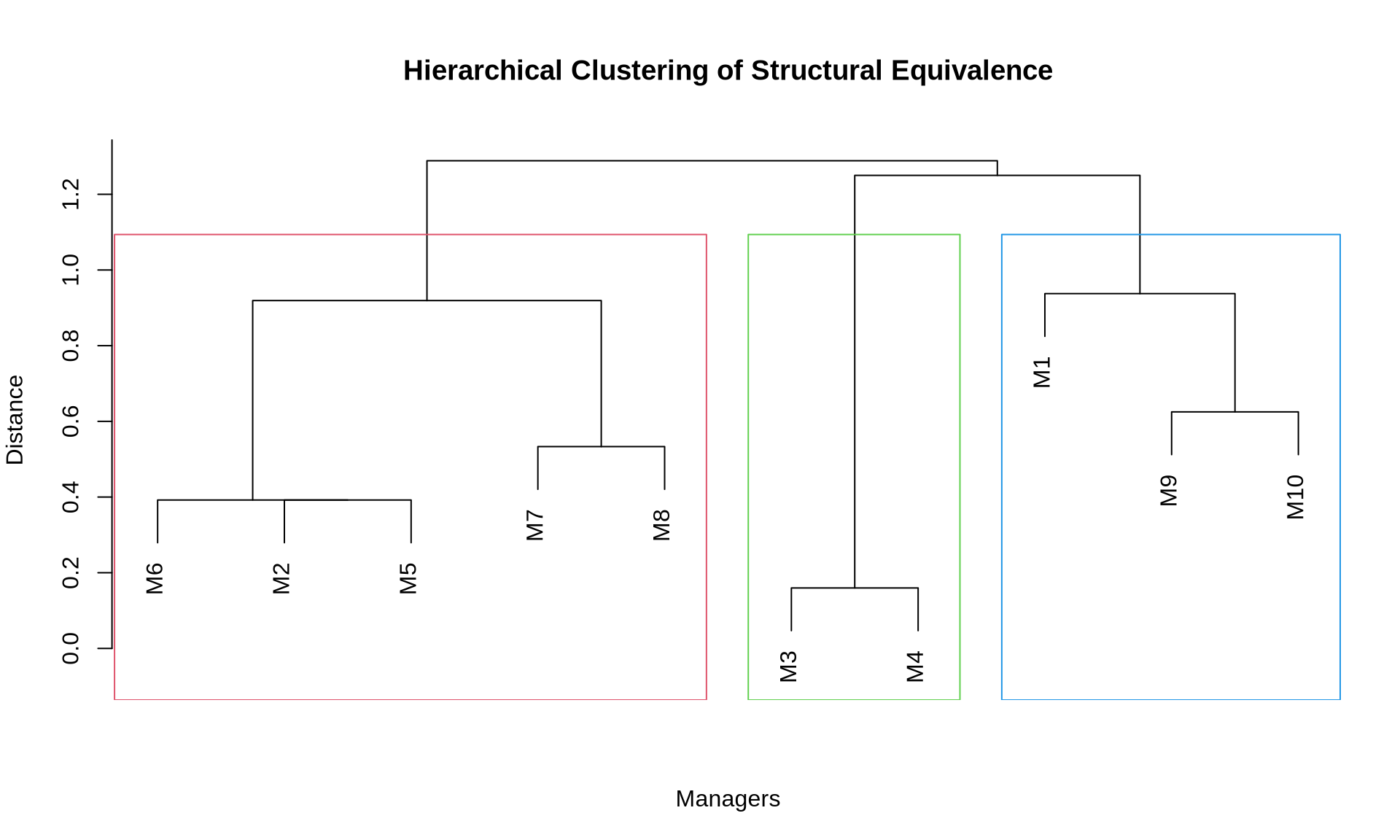
We can use hierarchical clustering to identify groups of structurally equivalent actors.

# Convert similarity to distance for clustering
# Use 1 - correlation as distance
dist_matrix <- as.dist(1 - similarity_matrix)

# Perform hierarchical clustering
hc <- hclust(dist_matrix, method = "complete")

# Plot dendrogram
par(mar = c(5, 4, 5, 2))
plot(hc,
     main = "Hierarchical Clustering of Structural Equivalence",
     xlab = "Managers",
     ylab = "Distance",
     sub = "")

# Add rectangles for 3 clusters
rect.hclust(hc, k = 3, border = 2:4)

4.1 Extract Clusters

# Cut tree to get 3 positions
positions <- cutree(hc, k = 3)

# Display position assignments
cat("Position assignments:\n")
Position assignments:
print(positions)
 M1  M2  M3  M4  M5  M6  M7  M8  M9 M10 
  1   2   3   3   2   2   2   2   1   1 
# Count members per position
cat("\nPosition sizes:\n")

Position sizes:
print(table(positions))
positions
1 2 3 
3 5 2 

5 CONCOR Algorithm

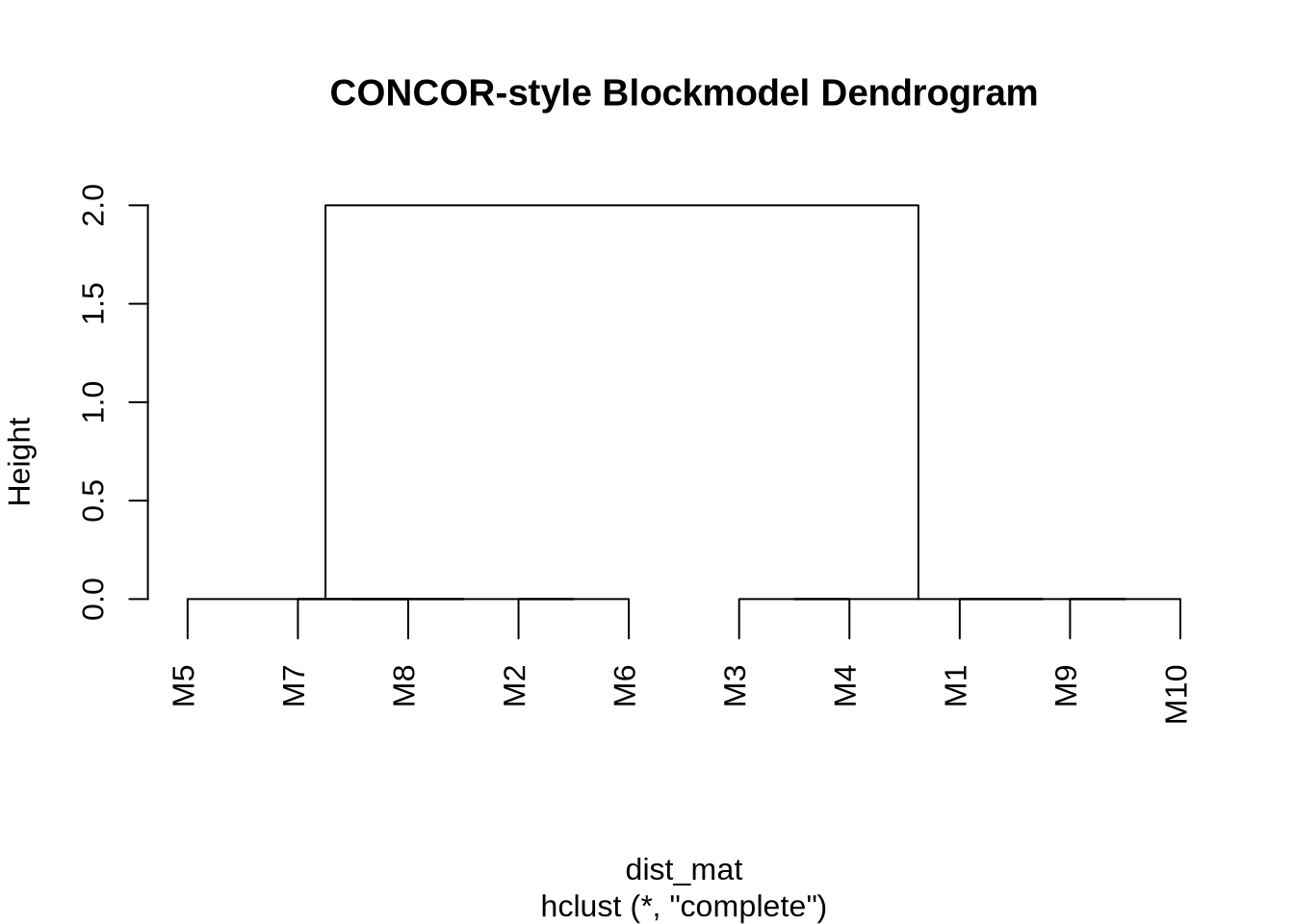
CONCOR (CONvergence of iterated CORrelations) is a classical algorithm specifically designed for blockmodeling. It works on a fascinating mathematical property: if you repeatedly calculate the correlation matrix of a correlation matrix, the values eventually converge to a matrix containing only +1 and -1.

This divides the actors into two distinct groups (blocks). We can then apply the procedure recursively to split these groups further, creating a hierarchical blockmodel.

5.1 Implementing CONCOR

# Perform CONCOR using custom implementation
# Simplified CONCOR algorithm
concor_simple <- function(adj_mat, max_iter = 25) {
  # Compute initial correlation matrix
  sim_mat <- compute_structural_equiv(adj_mat)
  
  # Iteratively correlate
  for(iter in 1:max_iter) {
    old_sim <- sim_mat
    sim_mat <- cor(sim_mat)
    
    # Check for convergence
    if(max(abs(sim_mat - old_sim)) < 0.001) break
  }
  
  # Convert to distance and cluster  
  dist_mat <- as.dist(1 - sim_mat)
  hc <- hclust(dist_mat, method = "complete")
  return(hc)
}

concor_result <- concor_simple(advice_mat)

# Plot CONCOR dendrogram
par(mar = c(5, 4, 5, 2))
plot(concor_result,
     main = "CONCOR-style Blockmodel Dendrogram")

# Get block membership (using 3 blocks)
concor_membership <- cutree(concor_result, k = 3)

cat("CONCOR block assignments:\n")
CONCOR block assignments:
print(concor_membership)
 M1  M2  M3  M4  M5  M6  M7  M8  M9 M10 
  1   2   3   3   2   2   2   2   1   1 

6 Creating Blockmodels

6.1 Reorder Matrix by Position

# Reorder adjacency matrix by position
block_order <- order(positions)
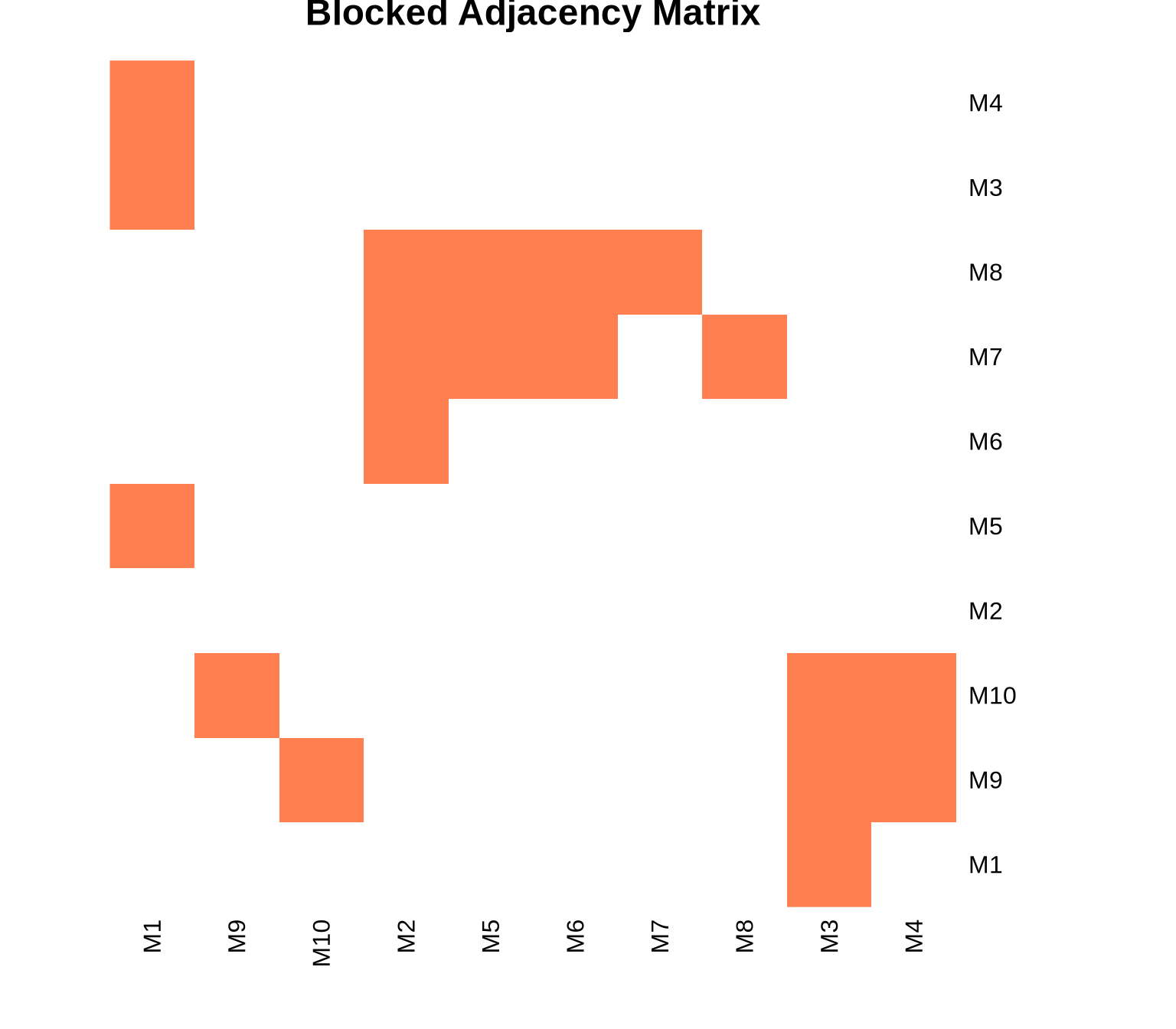
blocked_mat <- advice_mat[block_order, block_order]

# Display blocked matrix
cat("Reordered adjacency matrix by position:\n")
Reordered adjacency matrix by position:
print(blocked_mat)
    M1 M9 M10 M2 M5 M6 M7 M8 M3 M4
M1   0  0   0  0  0  0  0  0  1  0
M9   0  0   1  0  0  0  0  0  1  1
M10  0  1   0  0  0  0  0  0  1  1
M2   0  0   0  0  0  0  0  0  0  0
M5   1  0   0  0  0  0  0  0  0  0
M6   0  0   0  1  0  0  0  0  0  0
M7   0  0   0  1  1  1  0  1  0  0
M8   0  0   0  1  1  1  1  0  0  0
M3   1  0   0  0  0  0  0  0  0  0
M4   1  0   0  0  0  0  0  0  0  0

6.2 Visualize Blocked Matrix

# Create heatmap of blocked adjacency matrix
if (use_pheatmap) {
  pheatmap::pheatmap(blocked_mat,
           cluster_rows = FALSE,
           cluster_cols = FALSE,
           display_numbers = TRUE,
           number_format = "%.0f",
           main = "Blocked Adjacency Matrix",
           color = colorRampPalette(c("white", "coral"))(2),
           legend = FALSE)
} else {
  heatmap(blocked_mat, 
          Rowv = NA, Colv = NA,
          main = "Blocked Adjacency Matrix",
          col = c("white", "coral"),
          scale = "none")
}

7 Image Matrices

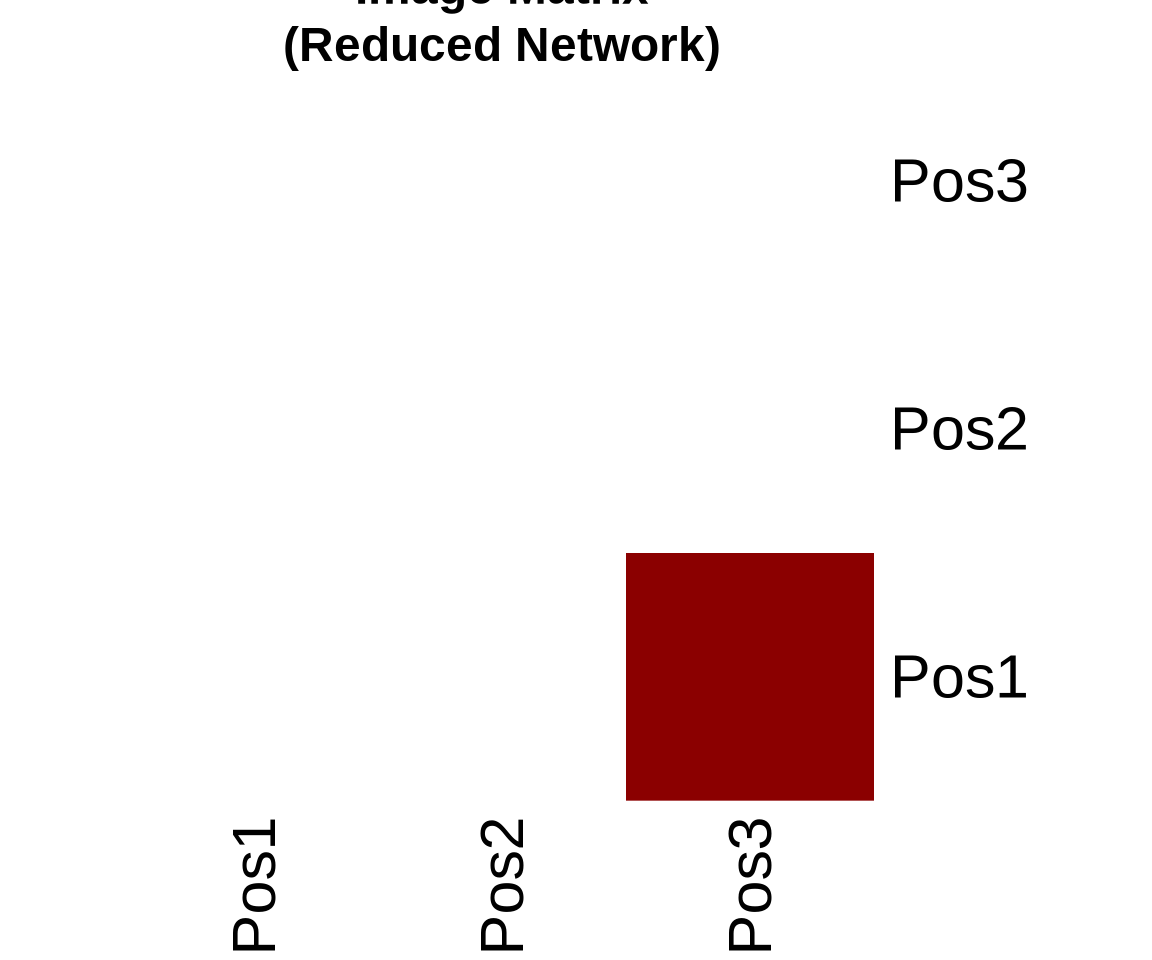
An image matrix is a simplified representation of the network. Instead of showing ties between individual actors, it shows ties between positions (blocks).

To create it, we calculate the density of ties between every pair of positions. If the density is above a certain threshold (often the overall network density or a specific alpha value), we say there is a ‘1-block’ (a tie between positions). Otherwise, it is a ‘0-block’.

7.1 Compute Image Matrix

# Function to create image matrix
create_image_matrix <- function(adj_matrix, positions, alpha = 0.5) {
  n_positions <- max(positions)
  image_mat <- matrix(0, nrow = n_positions, ncol = n_positions)
  
  for(i in 1:n_positions) {
    for(j in 1:n_positions) {
      # Get actors in positions i and j
      actors_i <- which(positions == i)
      actors_j <- which(positions == j)
      
      # Extract block
      block <- adj_matrix[actors_i, actors_j, drop = FALSE]
      
      # Calculate density
      block_density <- sum(block) / length(block)
      
      # Set image based on alpha threshold
      image_mat[i, j] <- ifelse(block_density >= alpha, 1, 0)
    }
  }
  
  rownames(image_mat) <- colnames(image_mat) <- paste0("Pos", 1:n_positions)
  return(image_mat)
}

# Create image matrix with alpha = 0.5
image_mat <- create_image_matrix(advice_mat, positions, alpha = 0.5)

cat("Image matrix (alpha = 0.5):\n")
Image matrix (alpha = 0.5):
print(image_mat)
     Pos1 Pos2 Pos3
Pos1    0    0    1
Pos2    0    0    0
Pos3    0    0    0

7.2 Visualize Image Matrix

# Visualize image matrix
if (use_pheatmap) {
  pheatmap::pheatmap(image_mat,
           cluster_rows = FALSE,
           cluster_cols = FALSE,
           display_numbers = TRUE,
           number_format = "%.0f",
           main = "Image Matrix\n(Reduced Network)",
           color = colorRampPalette(c("white", "darkred"))(2),
           legend = FALSE)
} else {
  heatmap(image_mat,
          Rowv = NA, Colv = NA,
          main = "Image Matrix\n(Reduced Network)",
          col = c("white", "darkred"),
          scale = "none")
}

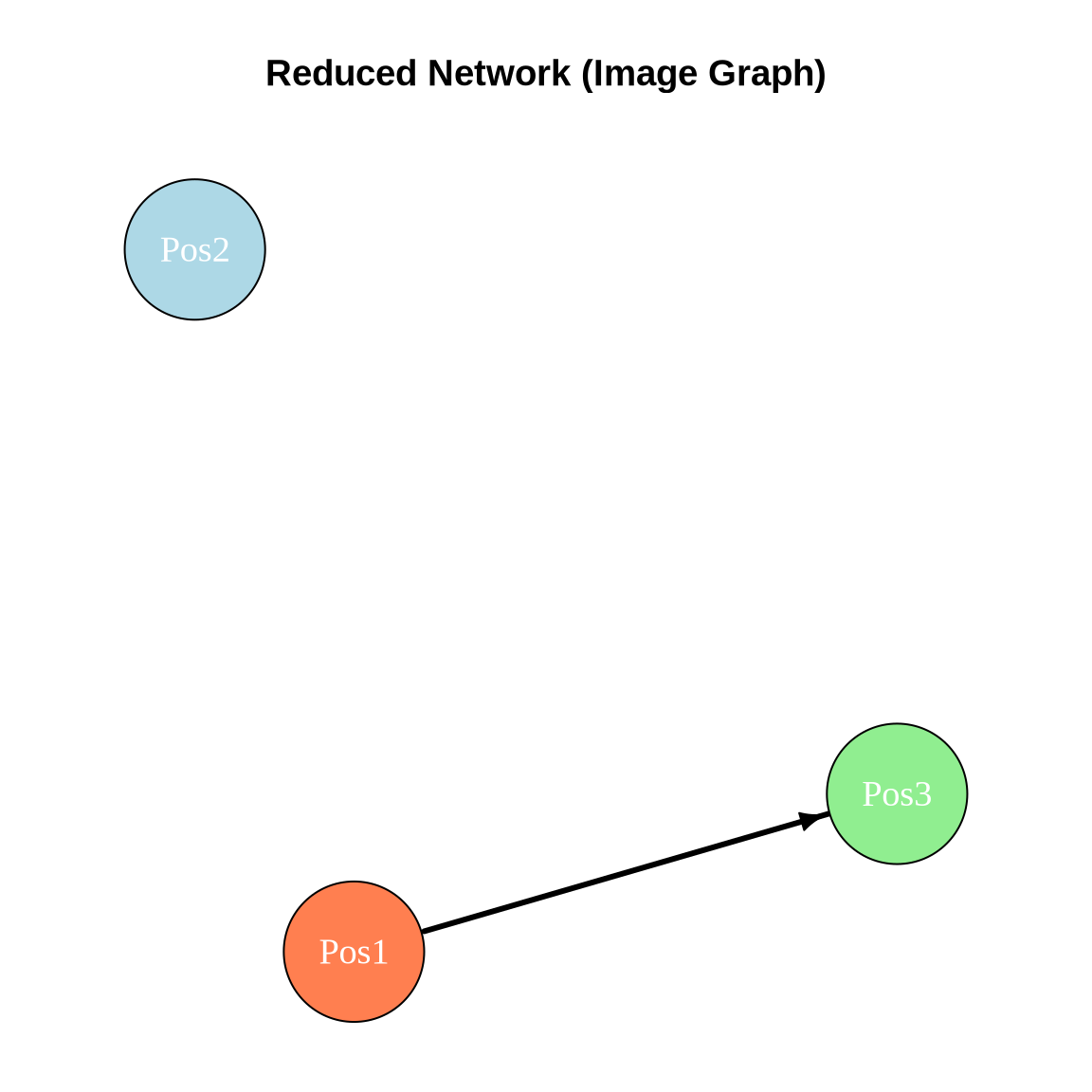
7.3 Plot Reduced Network

# Create network from image matrix
image_net <- graph_from_adjacency_matrix(image_mat, mode = "directed")

# Set vertex names
V(image_net)$name <- paste0("Pos", 1:vcount(image_net))

# Plot reduced network
set.seed(42)
# Set margins to ensure title is within bounding box
par(mar = c(1, 1, 4, 1))
plot(image_net,
     layout = layout_nicely(image_net),
     vertex.color = c("coral", "lightblue", "lightgreen")[1:vcount(image_net)],
     vertex.size = 40,
     vertex.label = V(image_net)$name,
     vertex.label.cex = 1.2,
     vertex.label.color = "white",
     edge.color = "black",
     edge.width = 3,
     edge.arrow.size = 0.8,
     main = "Reduced Network (Image Graph)")

8 Block Density Analysis

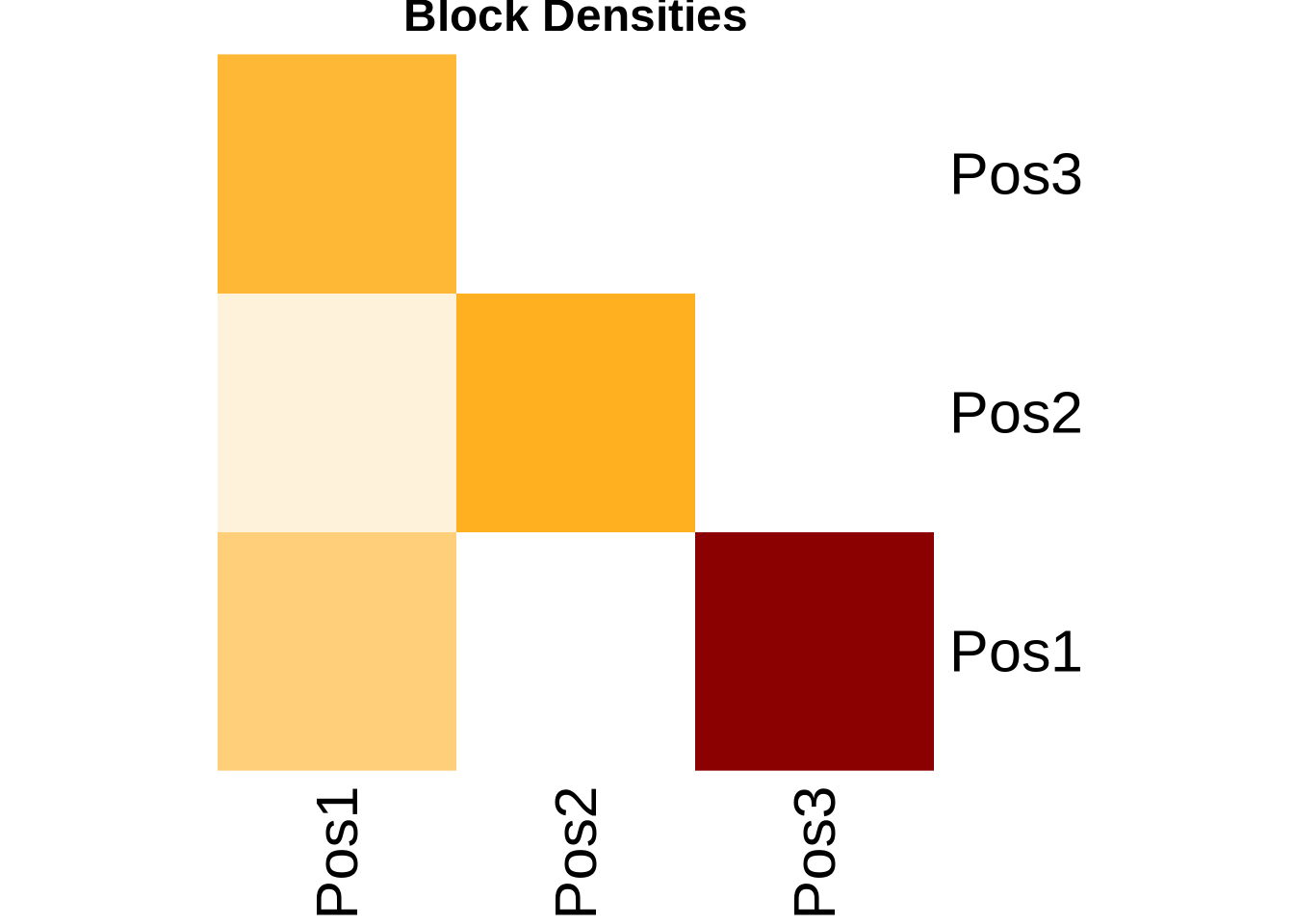
Analyze within-block and between-block densities to assess blockmodel quality.

# Function to compute block density table
compute_block_densities <- function(adj_matrix, positions) {
  n_positions <- max(positions)
  density_mat <- matrix(0, nrow = n_positions, ncol = n_positions)
  
  for(i in 1:n_positions) {
    for(j in 1:n_positions) {
      actors_i <- which(positions == i)
      actors_j <- which(positions == j)
      
      block <- adj_matrix[actors_i, actors_j, drop = FALSE]
      density_mat[i, j] <- sum(block) / length(block)
    }
  }
  
  rownames(density_mat) <- colnames(density_mat) <- paste0("Pos", 1:n_positions)
  return(density_mat)
}

# Compute block densities
block_densities <- compute_block_densities(advice_mat, positions)

cat("Block densities:\n")
Block densities:
print(round(block_densities, 3))
      Pos1 Pos2  Pos3
Pos1 0.222 0.00 0.833
Pos2 0.067 0.36 0.000
Pos3 0.333 0.00 0.000
# Visualize block densities
if (use_pheatmap) {
  pheatmap::pheatmap(block_densities,
           cluster_rows = FALSE,
           cluster_cols = FALSE,
           display_numbers = TRUE,
           number_format = "%.2f",
           main = "Block Densities",
           color = colorRampPalette(c("white", "orange", "darkred"))(100))
} else {
  heatmap(block_densities,
          Rowv = NA, Colv = NA,
          main = "Block Densities",
          col = colorRampPalette(c("white", "orange", "darkred"))(100),
          scale = "none")
}

9 Assessing Blockmodel Fit

9.1 Blockmodel Adequacy

We can measure how well the blockmodel represents the original network using correlation.

# Reconstruct network from blockmodel
reconstruct_from_blocks <- function(image_mat, positions) {
  n <- length(positions)
  recon_mat <- matrix(0, nrow = n, ncol = n)
  
  for(i in 1:n) {
    for(j in 1:n) {
      pos_i <- positions[i]
      pos_j <- positions[j]
      recon_mat[i, j] <- image_mat[pos_i, pos_j]
    }
  }
  
  return(recon_mat)
}

# Reconstruct
reconstructed <- reconstruct_from_blocks(image_mat, positions)

# Compute correlation between original and reconstructed
fit_cor <- cor(as.vector(advice_mat), as.vector(reconstructed))

cat("Blockmodel fit (correlation):", round(fit_cor, 3), "\n")
Blockmodel fit (correlation): 0.414 
# Compute accuracy
matching <- sum((advice_mat > 0) == (reconstructed > 0))
total <- length(advice_mat)
accuracy <- matching / total

cat("Classification accuracy:", round(accuracy, 3), "\n")
Classification accuracy: 0.85 

10 Example 2: Larger Network - Classic Blockmodel Study

Let’s use a larger, well-known dataset to demonstrate blockmodeling at scale.

# Create a stylized larger network with clearer role structure
# Simulating an organization with distinct hierarchical positions

n_senior <- 2
n_middle <- 4
n_junior <- 8
n_total <- n_senior + n_middle + n_junior

# Initialize matrix
org_mat <- matrix(0, nrow = n_total, ncol = n_total)
rownames(org_mat) <- colnames(org_mat) <- paste0("E", 1:n_total)

# Define position indices
senior_idx <- 1:n_senior
middle_idx <- (n_senior + 1):(n_senior + n_middle)
junior_idx <- (n_senior + n_middle + 1):n_total

# Add ties based on organizational hierarchy
# Juniors -> Middle managers (high density)
for(j in junior_idx) {
  contacts <- sample(middle_idx, size = 2)
  org_mat[j, contacts] <- 1
}

# Middle -> Seniors (high density)
for(m in middle_idx) {
  contacts <- sample(senior_idx, size = 1)
  org_mat[m, contacts] <- 1
}

# Seniors -> Middle (moderate density, delegation)
for(s in senior_idx) {
  contacts <- sample(middle_idx, size = 2)
  org_mat[s, contacts] <- 1
}

# Some peer connections within levels
# Junior peers
for(i in 1:3) {
  pair <- sample(junior_idx, 2)
  org_mat[pair[1], pair[2]] <- 1
}

# Middle peers
for(i in 1:2) {
  pair <- sample(middle_idx, 2)
  org_mat[pair[1], pair[2]] <- 1
}

# Create network
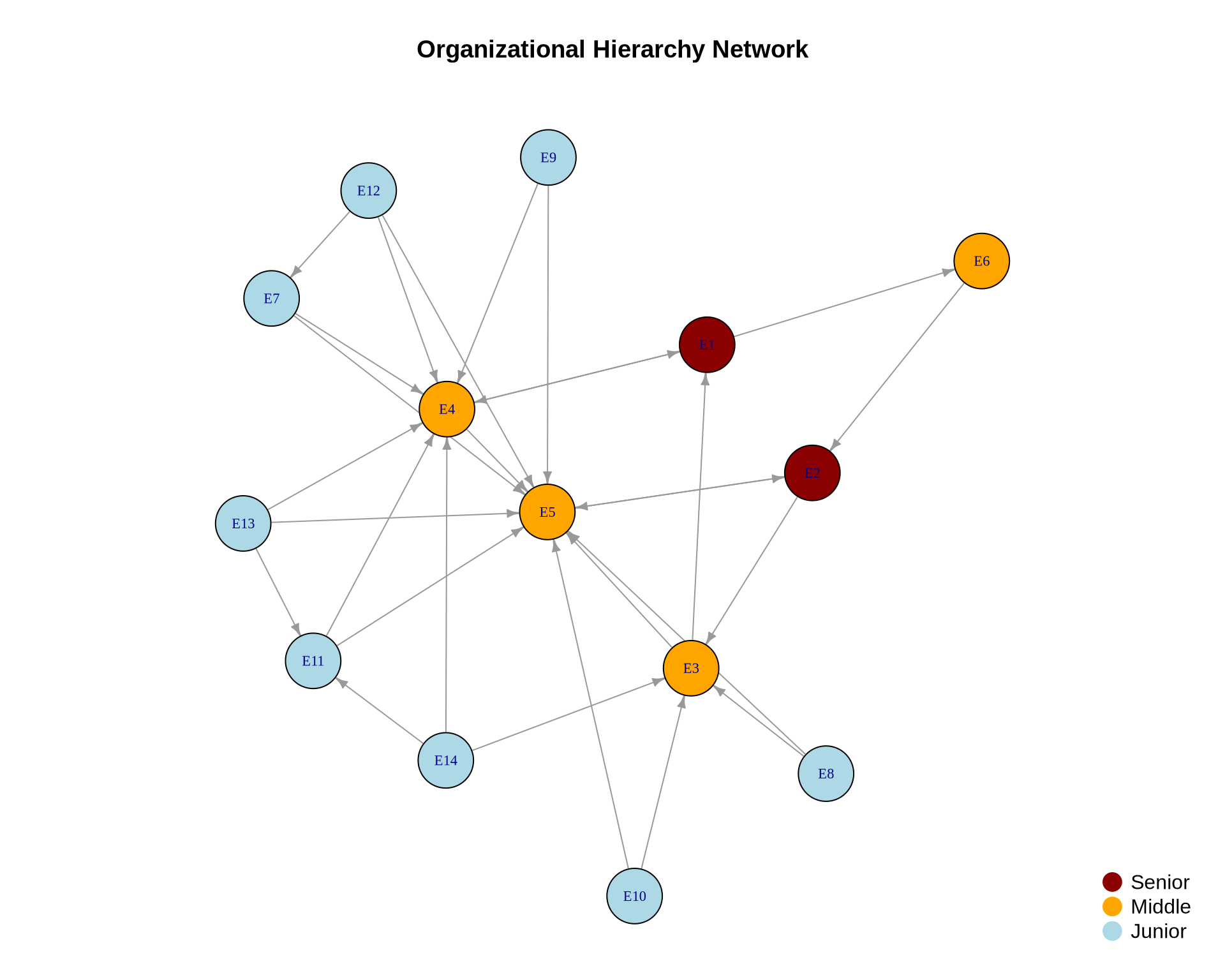
org_net <- graph_from_adjacency_matrix(org_mat, mode = "directed")

cat("Organization network:\n")
Organization network:
cat("Nodes:", vcount(org_net), "\n")
Nodes: 14 
cat("Edges:", ecount(org_net), "\n")
Edges: 29 

10.1 Visualize Organization Network

# Assign colors by true position
true_positions <- c(rep(1, n_senior), rep(2, n_middle), rep(3, n_junior))
colors <- c("darkred", "orange", "lightblue")[true_positions]

set.seed(42)
layout_org <- layout_with_fr(org_net)

# Set margins to ensure title is within bounding box
par(mar = c(1, 1, 4, 1))
plot(org_net,
     layout = layout_org,
     vertex.color = colors,
     vertex.size = 15,
     vertex.label = V(org_net)$name,
     vertex.label.cex = 0.7,
     edge.color = "gray60",
     edge.arrow.size = 0.5,
     main = "Organizational Hierarchy Network")

legend("bottomright", 
       legend = c("Senior", "Middle", "Junior"),
       col = c("darkred", "orange", "lightblue"),
       pch = 19,
       pt.cex = 2,
       bty = "n")

10.2 Apply Blockmodeling

# Compute structural equivalence
org_similarity <- compute_structural_equiv(org_mat)
org_equiv <- 1 - org_similarity  # Convert to distance

# Hierarchical clustering
org_hc <- hclust(as.dist(org_equiv), method = "complete")

# Cut for 3 positions
org_positions <- cutree(org_hc, k = 3)

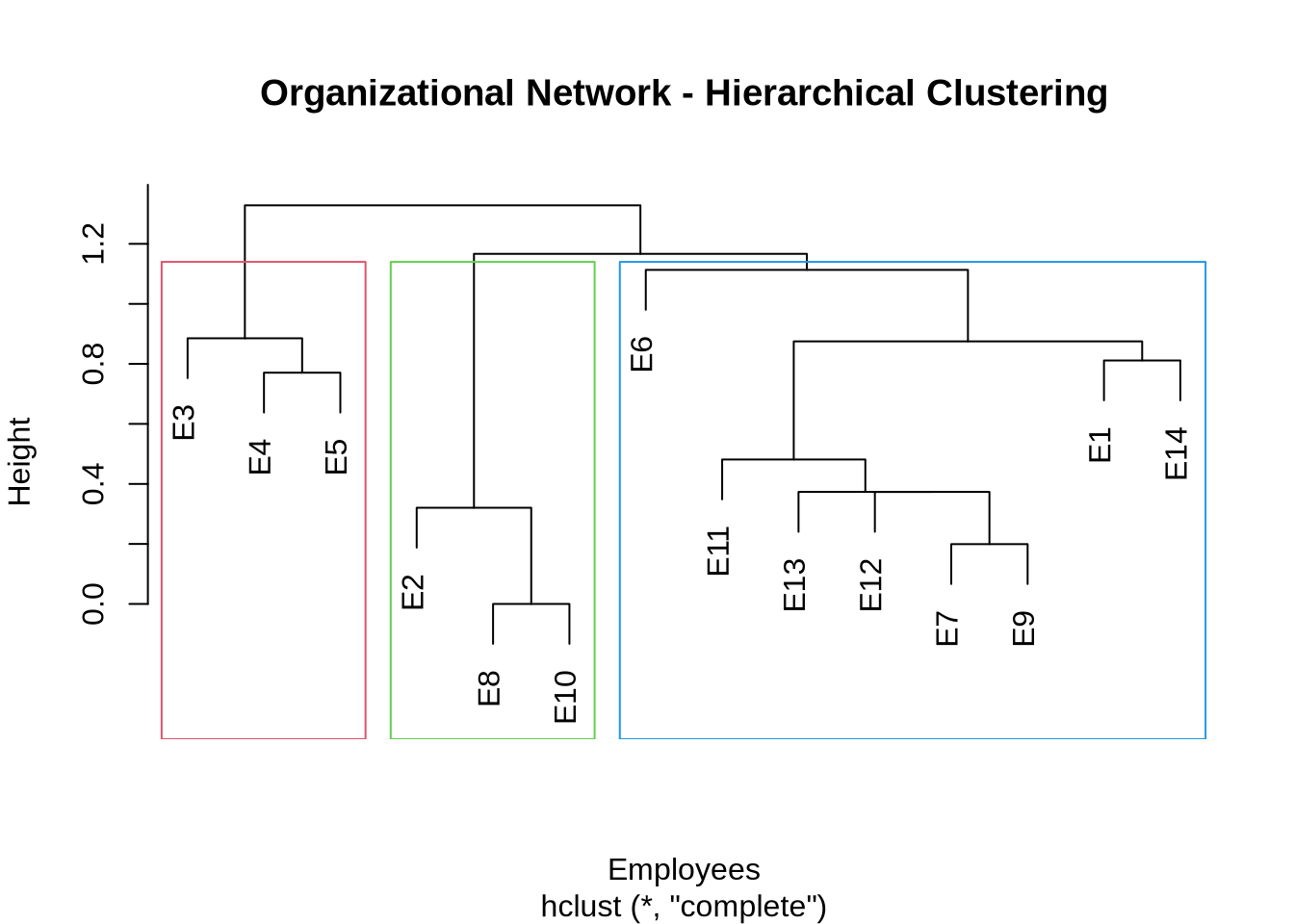
cat("Discovered positions:\n")
Discovered positions:
print(org_positions)
 E1  E2  E3  E4  E5  E6  E7  E8  E9 E10 E11 E12 E13 E14 
  1   2   3   3   3   1   1   2   1   2   1   1   1   1 
# Dendrogram
par(mar = c(5, 4, 5, 2))
plot(org_hc,
     main = "Organizational Network - Hierarchical Clustering",
     xlab = "Employees",
     labels = rownames(org_mat))
rect.hclust(org_hc, k = 3, border = 2:4)

10.3 Organization Image Matrix

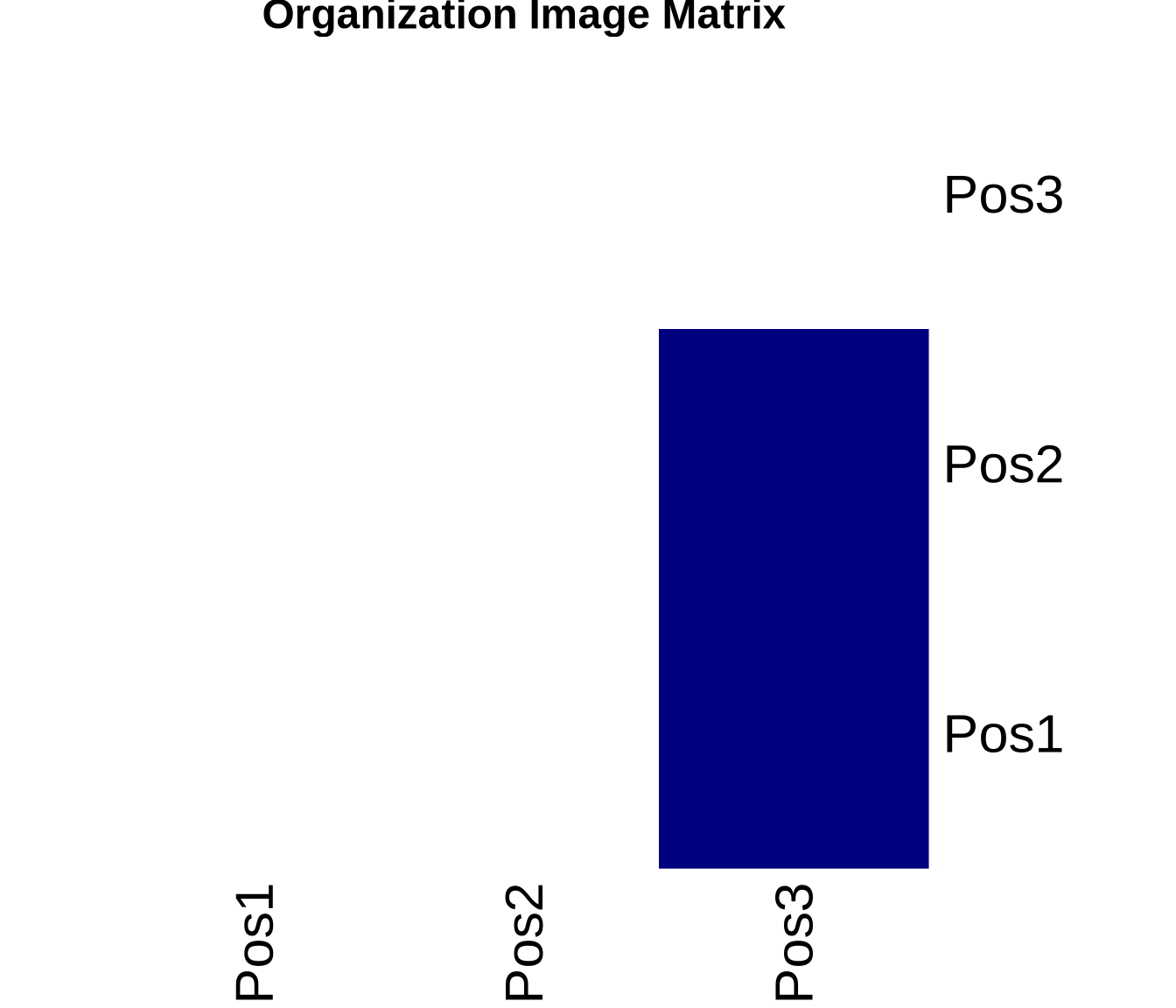
# Create image matrix
org_image <- create_image_matrix(org_mat, org_positions, alpha = 0.3)

cat("Organization image matrix:\n")
Organization image matrix:
print(org_image)
     Pos1 Pos2 Pos3
Pos1    0    0    1
Pos2    0    0    1
Pos3    0    0    0
# Visualize
if (use_pheatmap) {
  pheatmap::pheatmap(org_image,
           cluster_rows = FALSE,
           cluster_cols = FALSE,
           display_numbers = TRUE,
           number_format = "%.0f",
           main = "Organization Image Matrix",
           color = colorRampPalette(c("white", "navy"))(2),
           legend = FALSE)
} else {
  heatmap(org_image,
          Rowv = NA, Colv = NA,
          main = "Organization Image Matrix",
          col = c("white", "navy"),
          scale = "none")
}

# Block densities
org_densities <- compute_block_densities(org_mat, org_positions)

cat("\nBlock densities:\n")

Block densities:
print(round(org_densities, 3))
      Pos1  Pos2  Pos3
Pos1 0.062 0.042 0.542
Pos2 0.000 0.000 0.667
Pos3 0.083 0.111 0.222

11 Comparing Position Detection Methods

Let’s compare different methods for identifying positions.

# Method 1: Hierarchical clustering with correlation
method1 <- cutree(hclust(as.dist(1 - compute_structural_equiv(advice_mat)),
                         method = "complete"), k = 3)

# Method 2: Hierarchical clustering with Euclidean distance
method2 <- cutree(hclust(as.dist(compute_euclidean_dist(advice_mat)),
                         method = "ward.D2"), k = 3)

# Method 3: CONCOR
method3 <- cutree(concor_simple(advice_mat), k = 3)

# Compare assignments
comparison <- data.frame(
  Actor = rownames(advice_mat),
  Correlation_HC = method1,
  Euclidean_HC = method2,
  CONCOR = method3
)

print(comparison)
    Actor Correlation_HC Euclidean_HC CONCOR
M1     M1              1            1      1
M2     M2              2            2      2
M3     M3              3            3      3
M4     M4              3            3      3
M5     M5              2            2      2
M6     M6              2            2      2
M7     M7              2            2      2
M8     M8              2            2      2
M9     M9              1            1      1
M10   M10              1            1      1
# Calculate agreement between methods
cat("\nAgreement between methods:\n")

Agreement between methods:
cat("Correlation vs Euclidean:", 
    sum(method1 == method2) / length(method1), "\n")
Correlation vs Euclidean: 1 
cat("Correlation vs CONCOR:", 
    sum(method1 == method3) / length(method1), "\n")
Correlation vs CONCOR: 1 
cat("Euclidean vs CONCOR:", 
    sum(method2 == method3) / length(method2), "\n")
Euclidean vs CONCOR: 1 

12 Interpretation and Substantive Meaning

When interpreting blockmodels, consider the Image Matrix and the Block Densities:

  1. Reflexive ties (diagonal): A ‘1’ on the diagonal (e.g., Pos1 -> Pos1) means the position is internally cohesive (like a community).
  2. Asymmetric ties: A ‘1’ from Pos1 -> Pos2 but ‘0’ from Pos2 -> Pos1 suggests a hierarchy or flow (e.g., advice seeking).
  3. Isolates: A position with ’0’s everywhere suggests isolated actors.
  4. Core-Periphery: A core position connects to itself and others; a periphery position connects only to the core.

12.1 Role Interpretation

Based on our advice network analysis:

# Analyze each position's characteristics
for(pos in 1:3) {
  cat("\n=== Position", pos, "===\n")
  members <- which(positions == pos)
  cat("Members:", paste(names(members), collapse = ", "), "\n")
  
  # Out-degree (advice giving)
  out_deg <- rowSums(advice_mat[members, , drop = FALSE])
  cat("Avg out-degree:", round(mean(out_deg), 2), "\n")
  
  # In-degree (advice seeking)
  in_deg <- colSums(advice_mat[, members, drop = FALSE])
  cat("Avg in-degree:", round(mean(in_deg), 2), "\n")
}

=== Position 1 ===
Members: M1, M9, M10 
Avg out-degree: 2.33 
Avg in-degree: 1.67 

=== Position 2 ===
Members: M2, M5, M6, M7, M8 
Avg out-degree: 2 
Avg in-degree: 1.8 

=== Position 3 ===
Members: M3, M4 
Avg out-degree: 1 
Avg in-degree: 2.5 
TipInterpreting Positions
  • Position 1: High in-degree, low out-degree → Advice Givers (senior experts)
  • Position 2: Moderate both → Intermediaries (middle management)
  • Position 3: Low in-degree, high out-degree → Advice Seekers (juniors)

13 Key Takeaways

  1. Structural equivalence identifies actors with similar tie patterns, revealing role structures

  2. Multiple measurement approaches exist (correlation, Euclidean, etc.) - compare results

  3. CONCOR is a classical algorithm but hierarchical clustering offers more flexibility

  4. Image matrices provide reduced representations of complex networks

  5. Blockmodel fit should be assessed - not all networks have clear role structures

  6. Substantive interpretation is crucial - positions should make sense in context

  7. Position != Community - positions are about similar patterns, not cohesion

14 Exercises

14.1 Exercise 1: Apply to Karate Club

Load Zachary’s Karate Club network and:

  1. Compute structural equivalence between members
  2. Identify positions using hierarchical clustering
  3. Create and interpret the image matrix
  4. Do positions correspond to the known split?
# Starter code
library(igraph)
karate <- make_graph("Zachary")
karate_mat <- as_adjacency_matrix(karate, sparse = FALSE)

# Your code here

14.2 Exercise 2: Different Alpha Values

For the advice network:

  1. Create image matrices with alpha = 0.25, 0.5, 0.75
  2. Compare the resulting image graphs
  3. Which alpha best represents the network?

14.3 Exercise 3: Regular Equivalence (Advanced)

Research and implement a measure of regular equivalence (e.g., using the REGE algorithm or equiv.clust from the sna package):

  1. Understand the difference from structural equivalence
  2. Apply to the advice network
  3. Compare results with structural equivalence
  4. When would regular equivalence be more appropriate?

15 Additional Resources

  • Foundational paper: White, Boorman, & Breiger (1976). Social structure from multiple networks.

  • sna package documentation: CRAN sna reference

  • Blockmodeling book: Doreian, Batagelj, & Ferligoj (2005). Generalized Blockmodeling

  • Applied examples: Wasserman & Faust (1994), Chapters 9-10


Next Steps: Try combining community detection (from practice_1.qmd) with role analysis. Do structurally equivalent actors belong to the same communities? Often they don’t—community detection finds cohesive groups (friends), while role analysis finds similar types of people (e.g., all the “popular kids” might not be friends with each other, but they occupy the same role).